Amazon Seller Chart of Accounts: Build the Books Around the Decisions You Actually Make
The FBA Guys
May 7, 2026

The first version of an Amazon seller chart of accounts usually looks harmless.
Sales. Fees. Advertising. Inventory. Office expenses.
Then the business grows, and the books start asking for more precision than those five buckets can give. A reimbursement lands in the same place as revenue. A storage fee gets buried with fulfillment fees. Inventory deposits sit in expenses for three months, then the gross margin line looks like it fell down the stairs.
An Amazon seller chart of accounts is the category structure inside your accounting system. For an FBA business, it should separate product sales, refunds, COGS, inventory, Amazon fees, advertising, reimbursements, owner expenses, and balance sheet accounts in a way that supports monthly decisions.
The template matters because Amazon gives you activity. Your accounting system has to turn that activity into a business.
Start With the Decisions Your Books Need to Support
The chart of accounts is not there to make the P&L look tidy.
It has jobs.
Can you tell whether gross margin changed because product cost moved, freight moved, Amazon fees moved, or refunds moved? Can you separate launch spend from normal advertising? Can you explain why cash went down in a month when profit looked fine? Can you calculate SDE without digging through twelve months of miscellaneous expenses and trying to remember what a $1,200 software charge was for?
That last one gets expensive.
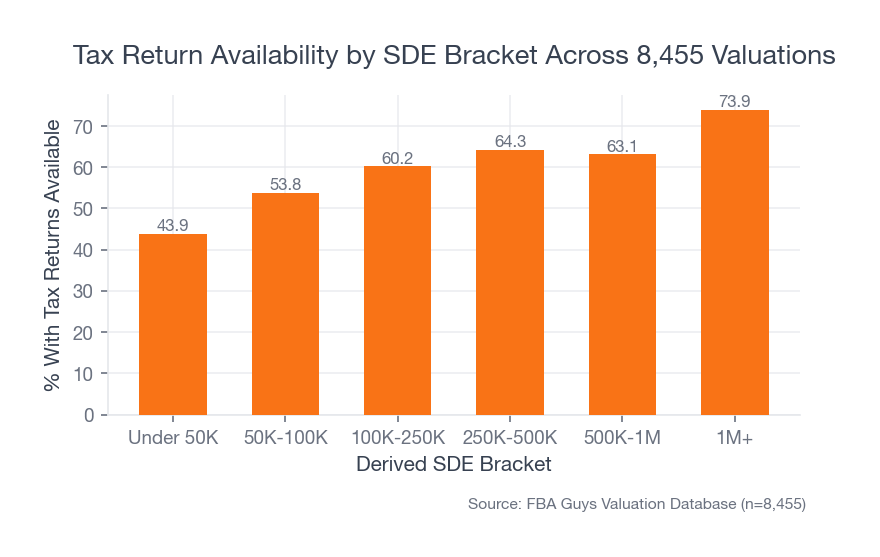
In our valuation database, only 43.9% of businesses under $50K in derived SDE had tax returns available. Above $1M in derived SDE, that number rose to 73.9%.
 Source: FBA Guys Valuation Database (n=8,455)
The pattern is not surprising. Larger businesses usually get forced into better documentation because the stakes become harder to ignore. The interesting part is how late that pressure arrives.
By the time your business is large enough to need clean books, the messy categories already have history.
Of course, a better chart of accounts won't fix bad accounting by itself. You still need accurate imports, monthly reconciliation, accrual inventory treatment, and someone who understands Amazon FBA accounting basics. The chart is the map. It doesn't drive the car.
But a bad map makes every month harder.
The Amazon Seller Chart of Accounts Template
Here is the working structure we would start with for most Amazon sellers:
| Account Category | Example Accounts | Why It Exists |
|---|---|---|
| Assets | Operating checking, Amazon unsettled balance, inventory, inventory deposits, prepaid expenses | Shows where cash and inventory value actually sit |
| Liabilities | Credit cards, loans, sales tax payable, income tax payable, customer refunds payable | Keeps obligations out of operating expenses |
| Equity | Owner contributions, owner draws, retained earnings | Separates owner movement from business performance |
| Revenue | Product sales, shipping income, gift wrap income, other marketplace revenue | Keeps sales channels readable |
| Contra Revenue | Refunds, promotional rebates, coupons, discounts | Shows how much revenue leaked back out |
| COGS | Product cost, inbound freight, duties, packaging, prep, landed cost adjustments | Connects product cost to units sold |
| Amazon Fees | Referral fees, FBA fulfillment fees, storage fees, inbound placement, removal fees, returns processing, subscription fees | Makes platform drag visible |
| Advertising and Promotions | Sponsored Products, Sponsored Brands, Sponsored Display, coupons, deals, external ads | Separates demand generation from fulfillment economics |
| Operating Expenses | Software, bookkeeping, contractors, legal, photography, samples, insurance, subscriptions | Captures normal operating costs |
| Owner and Add-Back Review | Owner salary, owner benefits, personal expenses, one-time cleanup costs, non-recurring legal | Preserves SDE review without pretending every add-back is automatic |
| Other Income and Adjustments | Amazon reimbursements, cashback, interest income, foreign exchange | Keeps odd items from distorting product sales |
This is not a tax return. It is an operating structure.
You can make it more detailed, and some businesses should. A brand with wholesale, Shopify, and Amazon revenue needs channel-level classes or locations. A business with bundles may need SKU-level inventory reporting outside the general ledger. A seller with heavy international sourcing may want separate duty, tariff, freight, inspection, and prep accounts.
Still, the starting point should be boring enough to use every month.
Revenue Accounts
Revenue needs more discipline than "Amazon Sales."
At minimum, separate:
- Amazon product sales
- Shipping income
- Gift wrap income
- Other marketplace revenue
- Wholesale revenue
- Direct-to-consumer revenue
If you sell only on Amazon, this may feel excessive. It won't for long if you add Shopify, Walmart, Faire, wholesale, or a small retail account that starts as a test and becomes 11% of revenue before anyone builds a reporting habit around it.
Amazon's own reports can also create timing confusion. Amazon says its Seller Central date range reports can include activity from closed and open settlements inside the selected date window. That is useful, but it means the report is not always the same thing as a clean monthly accrual P&L.
The books need a monthly view. The settlement report gives you the raw movement.
Refunds, Promotions, and Contra Revenue
Refunds deserve their own space.
So do coupons, rebates, and promotional discounts.
When refunds are buried inside sales or shoved into a generic Amazon adjustment account, net revenue gets harder to read. You can still get to the right total, but you lose the operating signal. A product with rising sales and rising refunds is saying something different from a product with stable refunds and rising fees.
The same goes for coupons and deals. A coupon is not just a marketing idea. It is a revenue concession with a fee structure attached to it, and it should be visible enough that you can see whether it bought profitable demand or just made the sales line look busier.
This is one of those places where the chart of accounts starts to feel picky.
Fine. Be picky here.
COGS and Inventory Accounts
COGS is where many Amazon P&Ls start telling a story the business didn't actually live.
For an FBA seller, COGS should usually include:
- Product cost
- Inbound freight
- Duties and tariffs
- Inspection costs
- Packaging
- Labeling and prep
- Landed cost adjustments
Inventory itself belongs on the balance sheet until the unit sells. When product cost gets expensed when you pay the supplier, a growing business can look less profitable during inventory build months and strangely profitable later when the inventory sells with no matching cost.
That is the part that quietly distorts SDE.
The Playbook's accounting section gives the example in plain terms: accrual accounting puts inventory cost on the balance sheet, then moves it to the P&L as units sell. For product businesses, that is the only way the monthly P&L has a fair chance of describing operating performance. If this is the recurring problem in your books, the deeper mechanics are covered in our guide to tracking COGS for Amazon FBA.
If your bookkeeper cannot produce monthly COGS that follows units sold, the chart of accounts is only one piece of the fix. You may also need inventory software, a landed-cost worksheet, or a recurring monthly adjustment process.
A composite from the data: a business can have a clean sales import, clean Amazon fees, and a respectable net income line, while the inventory account is doing all the damage quietly off to the side. The P&L looks calm. The balance sheet is sweating through its shirt.
Amazon Fee Accounts
Amazon fees should not live in one bucket forever.
Start with these accounts:
- Referral fees
- FBA fulfillment fees
- Monthly storage fees
- Long-term or aged inventory charges
- Inbound placement or inbound service fees
- Removal and disposal fees
- Returns processing fees
- Subscription fees
- Account-level service fees
As of the writing of this article, Amazon's Flat File V2 Settlement Report uses amount-type, amount-description, and amount columns for charges and fees. Amazon says this format replaced older flat file and XML settlement reports, and the current docs list fields such as transaction type, order ID, SKU, quantity purchased, amount description, and amount.
That structure is useful because fee descriptions can be mapped into accounting categories. It is also dangerous if you let every new description fall into "Amazon Fees."
The fact is, fee visibility changes behavior.
When storage fees sit beside fulfillment fees, slow inventory is easier to ignore. When removal fees sit beside referral fees, stale catalog decisions hide inside platform cost. When inbound placement fees have their own account, a packaging or replenishment decision can be reviewed instead of shrugged into the monthly total. If the report itself is still the mystery, start with how to read an Amazon settlement report.
This section is deliberately longer because the fee table is where Amazon sellers lose the plot most often. The fees are sitting in reports. The accounting categories often flatten them into one line, and one line cannot tell you whether the issue is product economics, inventory planning, promotion structure, or fulfillment shape.
Advertising, Promotions, and Launch Costs
Advertising should be separated by normal spend and launch or experimental spend when the numbers are material.
You do not need twenty ad accounts in the general ledger. Your ad platform can carry campaign detail. The accounting system needs enough structure to answer a simpler question: what did the business need to spend to maintain demand?
A practical structure:
- Amazon PPC
- External advertising
- Coupons and deals
- Influencer or affiliate spend
- Launch and testing spend
- Creative production for ads
Launch spend is the awkward one.
If you are launching new SKUs every quarter, some of that cost may be normal operating behavior. If you did one unusual launch push in the trailing twelve months, a buyer or valuation review may treat part of it differently. The chart of accounts should leave enough evidence to discuss it cleanly later.
Operating Expenses and Owner Add-Backs
Normal operating expenses should stay normal.
Software, bookkeeping, contractors, insurance, photography, legal, samples, subscriptions, and warehouse supplies all need a place. The temptation is to create a dozen oddly specific categories for every tool you use. Resist that unless the category changes a decision.
Add-back review is different.
SDE is net income plus legitimate owner benefits, one-time expenses, and non-cash expenses that won't carry forward to a buyer. The accounting categories should make those candidates easier to identify, but they should not pre-approve them. For the full SDE workflow, read how to calculate SDE for an Amazon business.
Good accounts for review:
- Owner salary
- Owner payroll taxes
- Owner health insurance
- Personal meals and travel
- One-time legal
- One-time bookkeeping cleanup
- Non-recurring consulting
- Depreciation
- Amortization
- Interest expense
Do not turn the chart of accounts into an add-back wish list. If an expense was real, recurring, and necessary to operate the business, it probably belongs in operating expenses. If it was personal, one-time, non-cash, or tied to the owner rather than the business, preserve the detail and let the SDE review handle it.
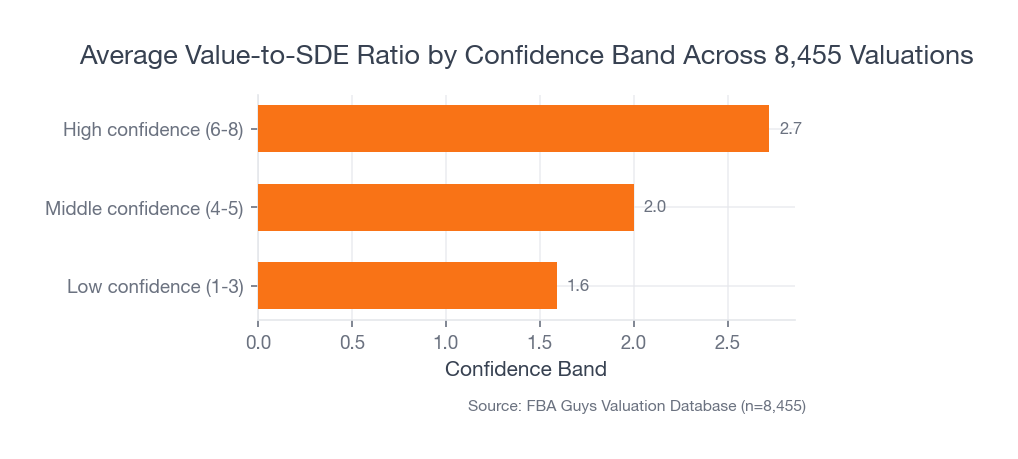
Among successful valuations in our database, higher confidence-band submissions had materially higher average value-to-SDE ratios: 1.59x for low-confidence records, 2.00x for middle-confidence records, and 2.72x for high-confidence records.
 Source: FBA Guys Valuation Database (n=8,455)
That chart should not be read as "clean books cause a higher multiple." Confidence includes more than accounting.
It does say something useful, though. Cleaner, more complete submissions tend to travel with better valuation reads. A chart of accounts earns its keep by making the business easier to explain.
Balance Sheet Accounts Most Amazon Sellers Ignore
The balance sheet is where inventory-heavy businesses confess.
Your chart should include:
- Operating checking
- Credit cards
- Amazon unsettled balance
- Inventory
- Inventory deposits
- Prepaid expenses
- Loans
- Sales tax payable
- Income tax payable
- Owner draws
- Owner contributions
Amazon unsettled balance is worth separating because payouts do not always line up neatly with monthly performance. Cash may be sitting inside Amazon, held for reserve, clearing through settlement timing, or moving toward the bank after the month closes.
Inventory deposits matter for the same reason. If you wire a supplier $35,000 in March for units that won't be received until May, March didn't suddenly become a terrible operating month. The cash moved. The product cost has not hit the P&L yet.
That distinction is basic accounting. It is also where a surprising number of useful monthly conversations begin.
When You Sell on More Than Amazon
A pure Amazon business can keep the general ledger relatively simple.
The moment another channel matters, you need a little more structure. Not drama. Structure.
If Shopify sales, wholesale orders, retail purchase orders, or Walmart marketplace revenue run through the same bank account, your chart of accounts should still let you see Amazon by itself. Sometimes that means separate revenue accounts. Sometimes it means classes or locations in QuickBooks or tracking categories in Xero. The exact tool matters less than the monthly answer: can you tell which channel produced the margin?
This is where a surprisingly clean P&L can still leave you stuck. The total revenue line looks fine, the total ad spend looks fine, and the business looks like it is moving in one direction. Then you separate the channels and realize Amazon is carrying the margin while the direct-to-consumer test is eating cash through shipping, returns, and agency fees. Or the opposite happens, which is much more pleasant. Either way, you want to know before the experiment becomes part of the normal run rate.
You don't need every channel detail in the chart of accounts. Your operating dashboard can carry the fine print. The books just need enough separation that the monthly P&L doesn't blur three different businesses into one average.
How to Use the Template Month After Month
The template only helps if the monthly close has a rhythm.
Use this cadence:
- Import Amazon settlement activity and map fee descriptions to the right accounts.
- Reconcile bank, credit card, and Amazon payout balances.
- Book inventory purchases to the balance sheet.
- Move landed COGS to the P&L based on units sold.
- Review refunds, reimbursements, storage fees, and advertising as separate trends.
- Reclassify owner, one-time, and non-recurring items while the month is still fresh.
- Export a monthly P&L and compare gross margin, contribution margin, net margin, and cash movement.
The messy detail is usually a name. "Amazon Misc." "Other Fees." "Ask CPA." "Inventory Adj." Those accounts are where next month's cleanup starts.
If a category gets used every month and nobody knows what it means, rename it. If a category is so broad that it catches five different business events, split it. If a category is so narrow that it gets one $17 charge a year, merge it.
A Simple Amazon Seller Chart of Accounts
Here is a compact version you can hand to a bookkeeper as a starting point:
Assets
- 1000 Operating Checking
- 1010 Amazon Unsettled Balance
- 1200 Inventory
- 1210 Inventory Deposits
- 1220 Prepaid Expenses
Liabilities
- 2000 Credit Card Payable
- 2100 Loans Payable
- 2200 Sales Tax Payable
- 2300 Income Tax Payable
- 2400 Customer Refunds Payable
Equity
- 3000 Owner Contributions
- 3100 Owner Draws
- 3200 Retained Earnings
Revenue and Contra Revenue
- 4000 Amazon Product Sales
- 4010 Shipping Income
- 4020 Gift Wrap Income
- 4100 Shopify or DTC Sales
- 4200 Wholesale Sales
- 4900 Refunds and Returns
- 4910 Coupons and Promotional Rebates
Cost of Goods Sold
- 5000 Product Cost
- 5010 Inbound Freight
- 5020 Duties and Tariffs
- 5030 Packaging and Inserts
- 5040 Prep and Labeling
- 5050 Landed Cost Adjustments
Amazon Fees
- 6000 Referral Fees
- 6010 FBA Fulfillment Fees
- 6020 Storage Fees
- 6030 Inbound Placement Fees
- 6040 Removal and Disposal Fees
- 6050 Returns Processing Fees
- 6060 Subscription and Account Fees
Advertising and Promotions
- 7000 Amazon PPC
- 7010 External Advertising
- 7020 Coupons and Deals
- 7030 Launch and Testing Spend
- 7040 Creative Production
Operating Expenses
- 8000 Software
- 8010 Bookkeeping
- 8020 Contractors
- 8030 Legal and Professional
- 8040 Product Photography
- 8050 Samples
- 8060 Insurance
- 8070 Office and Supplies
- 8080 Education and Conferences
Other Income, Other Expense, and Review Accounts
- 9000 Amazon Reimbursements
- 9010 Cashback and Rewards
- 9100 Interest Expense
- 9200 Depreciation
- 9210 Amortization
- 9300 One-Time Expenses for Review
- 9310 Owner Benefits for Review
This template is intentionally plain. A good bookkeeper can make it more sophisticated. A busy owner can still understand it.
Frequently Asked Questions
What is an Amazon seller chart of accounts?
An Amazon seller chart of accounts is the list of accounting categories used to organize sales, refunds, COGS, Amazon fees, advertising, assets, liabilities, equity, and operating expenses. It is the structure behind your P&L and balance sheet.
Should Amazon fees be one account or several?
Several, once the business has meaningful volume. A tiny account can survive with one Amazon fees account for a while, but referral fees, FBA fulfillment, storage, inbound placement, removal fees, and returns processing eventually need daylight.
Should inventory purchases go straight to COGS?
Usually no for an inventory-based Amazon business. Inventory purchases normally sit on the balance sheet first, then move to COGS as units sell. Work with an e-commerce bookkeeper on the mechanics, especially if you need accrual books.
Can I use this template in QuickBooks or Xero?
Yes, as a starting structure. QuickBooks or Xero can both support a chart like this, but the mapping from Amazon reports, settlement data, inventory tools, and bank feeds still has to be configured carefully.
Do I need a CPA to set this up?
You may want CPA input for tax treatment, entity structure, and year-end review. For monthly bookkeeping mechanics, an e-commerce bookkeeper is usually the better day-to-day operator. The two roles solve different problems.
The Books Should Make the Business Less Mysterious
A chart of accounts is easy to underestimate because it looks like administrative plumbing.
Then one month the profit line looks wrong, cash is lower than expected, inventory is higher than anyone remembered, and the only explanation available is a handful of accounts named "Amazon Fees" and "Misc."
Build the categories before you need them.
The cleanest chart of accounts won't make a weak business valuable. It will make the business easier to read. That is enough. In an Amazon business, clear reading is where better decisions usually start.
Curious what your business is worth?
Get a free, instant valuation and see how your Amazon business stacks up.
Get Your Free Valuation