Amazon Seller Performance Notifications: The Warning Is the Record
The FBA Guys
June 2, 2026

The most useful Amazon warning isn't always the loudest one.
Sometimes it is the one you handled quickly, forgot about, and then had to explain six months later when someone asked why the account-health export had a scar in it. Amazon seller performance notifications are Seller Central messages that tell you when Amazon has identified an account-health, policy, listing, customer-service, or shipping-performance issue. They usually explain the problem, point you toward the required next step, and create a dated record inside the account.
That record matters.
The notification itself may be small. A listing complaint. A late shipment pattern. A policy warning that stays quiet after you fix the behavior. But the record becomes part of how the account tells its story. If the issue is resolved, documented, and prevented from repeating, it reads very differently from a vague warning that no one can explain.
In the FBA Guys valuation database, account-health fields are still newer data. We have 8,542 successful valuation records overall, but only 394 successful 2026 records with populated account-health and suspension-history answers. So this isn't a whole-database claim.
It is still useful.
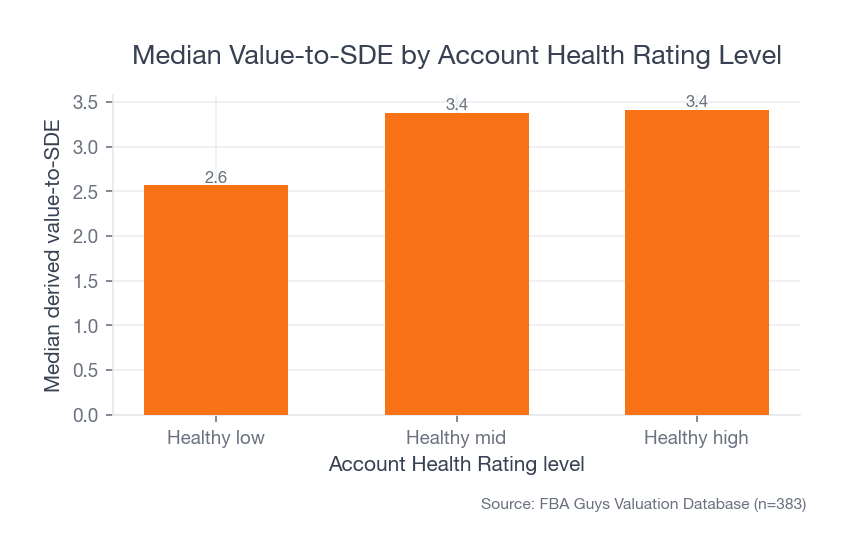
Among those 394 records, healthy-high accounts showed a 3.41 median derived value-to-SDE. Healthy-mid accounts were close at 3.38. Healthy-low accounts were lower at 2.57. The data doesn't prove Account Health Rating causes valuation. It does show that cleaner account-health signals tend to travel with stronger business profiles.
 Source: FBA Guys Valuation Database (n=383)
The interesting part is what happens when a notification becomes history.
What Amazon Seller Performance Notifications Actually Are
Performance notifications are Amazon's formal messages about the health and behavior of your selling account. You find them in Seller Central under Performance. They can relate to account health, listing policy, shipping performance, order defects, intellectual property complaints, authenticity concerns, restricted products, customer complaints, or other issues Amazon wants you to address.
Some are informational. Some are warnings. Some require an appeal or plan of action. Some typically point you back to the Account Health page, where Amazon shows the violation and the next step.
That distinction matters because the notification isn't just an email.
It is the paper trail.
If you later need to explain what happened, the performance notification usually gives you the starting point: date, category, ASIN or policy area, Amazon's stated concern, and response path. Even when the message feels thin, it gives you a record to preserve.
This is where a lot of operators get casual. The issue gets fixed, the listing comes back, the account stays green, and the notification fades into the background. Then the business is being valued, refinanced, audited, sold, or reviewed by a serious buyer, and someone asks for the account-health history.
Now you need the story.
Where Notifications Fit Inside Account Health
Amazon's Account Health page is the dashboard. Performance notifications are often the message trail behind the dashboard.
As of the writing of this article, Amazon describes Account Health Rating as a color-coded score from 0 to 1,000. New sellers start at 200. A score from 200 to 1,000 is Healthy, 100 to 199 is At Risk, and 99 or lower is Unhealthy. Amazon says the rating reflects certain policy violations and selling activity over the last 180 days, and that unresolved violations can lower the score.
Amazon also makes one point sellers shouldn't skip: a Healthy AHR doesn't protect you from every kind of deactivation. Amazon can still deactivate an account for fraudulent, deceptive, illegal, harmful, or out-of-scope policy issues.
Account Health is useful. It isn't a force field.
That is why the notification record deserves its own discipline. The dashboard tells you where the account stands. The notification tells you what happened and what Amazon asked you to do.
The Account Health page also separates different families of risk: customer-service performance, shipping performance, listing compliance, and broader policy compliance. A late-shipment issue isn't the same kind of risk as a suspected counterfeit complaint. A product-condition complaint isn't the same as review manipulation. They may all show up near the same account-health surface, but they don't carry the same weight.
Read Severity Before You Read Tone
Amazon messages can be oddly calm for issues that deserve your full attention.
That makes severity more useful than tone. In Amazon's Account Health Rating policy, violations can be categorized as critical, high, medium, or low severity. Critical violations can immediately qualify an account for deactivation after a short grace period. High-severity violations carry less tolerance. Medium and low issues still matter, especially when they repeat.
The first triage question is simple: what category of risk is Amazon describing?
Policy compliance usually needs a different response than order-performance drift. Intellectual property complaints need different evidence than a late-shipment problem. Authenticity complaints may require invoices, supply-chain proof, or product documentation. A customer-service metric problem may need operational fixes, not a legal argument dressed up as an appeal.
There is a messy little moment here that almost every account operator recognizes. Someone opens the notification, sees three paragraphs of Amazon language, copies the last sentence into Slack, and asks, "Is this bad?" The answer depends on the category, the deadline, the account-health impact, the ASIN exposure, and whether anything like it has happened before.
"Is this bad?" isn't a workflow.
The Notification Becomes a Business Record
The fact is, a performance notification is easiest to handle on the day it arrives and hardest to explain after everyone has forgotten the details.
This is where the valuation angle gets interesting. Our account-health dataset is narrow because the fields are new, but the pattern is worth looking at. Among 394 successful 2026 valuation records with account-health answers, healthy-high and healthy-mid accounts had materially higher median derived value-to-SDE than healthy-low accounts.
Again, no causation claim. Account Health Rating is one signal inside a larger business.
But it is a signal buyers can ask about early. By 2024, our industry notes show buyers asking for full account-health exports on day one of due diligence. That makes sense. Account-health issues aren't always deal-killers, but hidden account-health issues are the kind of risk that make people slow down. That same risk lens shows up in broader Amazon FBA business valuation work.
There is another pattern in the data that changed how this article should be written.
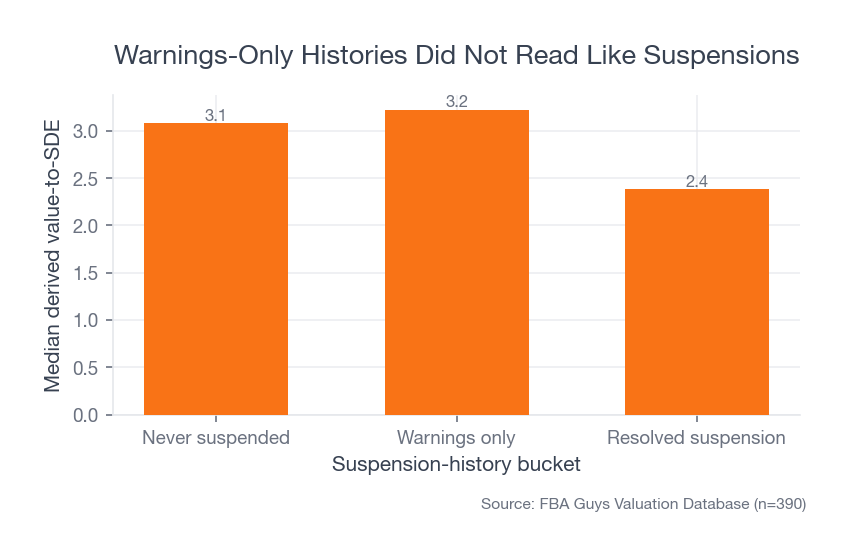
The warnings-only bucket didn't behave like the resolved-suspension bucket. Businesses with no suspension history had a 3.08 median derived value-to-SDE across 215 records. Businesses with warnings only had a 3.22 median across 105 records. Businesses with resolved suspensions had a 2.38 median across 70 records.
 Source: FBA Guys Valuation Database (n=390)
That doesn't mean warnings are harmless. Some warnings are serious. It suggests that a warning record, handled and kept from becoming a larger pattern, reads differently from a suspension history.
Useful.
It means the better question isn't, "How do I make the notification disappear?" The better question is, "How do I resolve the issue and preserve proof that the account is under control?"
A Warning Is Different From a Suspension
Suspensions are recency-dependent. A recent suspension can kill a deal conversation quickly. A suspension 18 months ago, resolved and followed by a clean record, can become a price and diligence conversation. Multiple suspensions or review manipulation are much harder to explain.
Performance notifications sit earlier in that chain.
Some are warnings. Some are metric alerts. Some are listing-level issues. Some are the first sign that a bigger problem is forming. The work is to keep the small record from becoming a larger one, and to make sure the business can explain what happened if someone reviews the account later.
In our 2026 data, resolved suspension histories showed lower median derived value-to-SDE than never-suspended or warnings-only histories. The active-issues bucket had only four records, so it isn't useful for inference. The tiny sample is almost a warning by itself: don't build a valuation story around unresolved account-health trouble.
If you are selling, raising capital, or simply trying to understand what the business is worth, unresolved account-health issues are a bad place to be improvising.
How to Triage a Performance Notification
The first response should be boring.
Save the notification. Screenshot it. Copy the text. Record the date received, the ASIN or marketplace involved, the deadline, the policy category, and the exact action Amazon is requesting. Then identify whether Amazon wants an appeal, a document upload, a listing edit, a plan of action, a metric improvement, or no immediate submission.
Then slow down just enough to avoid making the record worse.
For a policy issue, read the specific policy. For an authenticity or IP issue, gather invoices, supplier records, trademark records, authorization letters, or rights-owner correspondence before responding. For order-performance metrics, pull the orders that created the metric. For late shipment, pre-fulfillment cancellation, or valid tracking issues, separate FBA issues from seller-fulfilled issues because the operating fixes are different.
Amazon's order-performance policy currently defines Order Defect Rate as orders with negative feedback, A-to-z claims, or credit-card chargebacks over a 60-day period, with a target under 1%. Pre-fulfillment cancellation rate applies to seller-fulfilled orders over 7 days, with a target under 2.5%. Late shipment rate applies to seller-fulfilled orders over 10-day and 30-day windows, with a target under 4%. Valid Tracking Rate applies to seller-fulfilled shipments over 30 days, with a target greater than 95%.
These thresholds are policy language, not folklore. Check the current Amazon page before acting because Amazon can change program rules.
Once you know the category, write the response around evidence. What happened? What changed? What proof supports the change? Who owns the prevention step now?
Short, factual, documented.
Build the Notification File While the Details Are Fresh
The notification file doesn't need to be fancy. It needs to exist.
For each meaningful notification, keep:
- The original notification text.
- Screenshots from Account Health.
- The ASIN, SKU, marketplace, order IDs, or policy category involved.
- The submitted appeal or response.
- Evidence provided to Amazon.
- Amazon's response or final status.
- The internal fix.
- The prevention step.
- The owner of the prevention step.
- The date the issue was resolved.
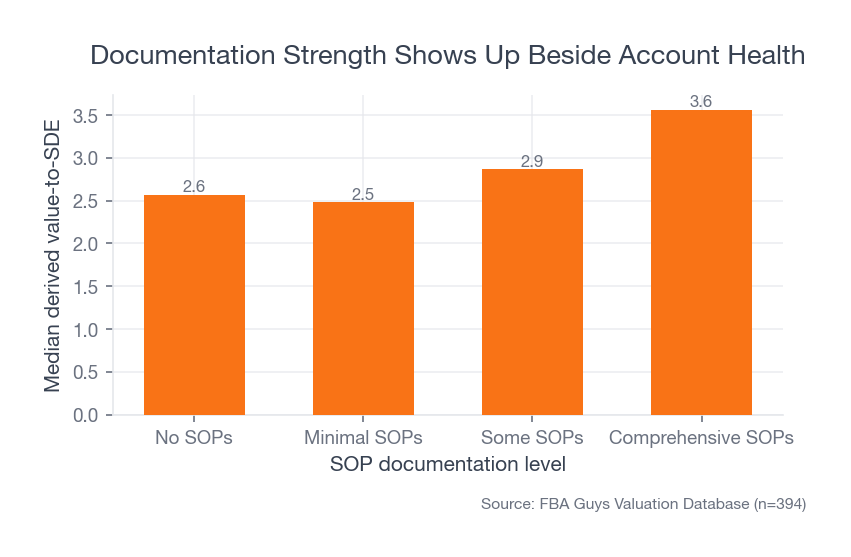
This is where SOP documentation starts to matter. In the 2026 account-health sample, businesses with comprehensive SOPs had a 3.56 median derived value-to-SDE. Businesses with no SOPs had a 2.57 median. Minimal SOPs were at 2.48.
 Source: FBA Guys Valuation Database (n=394)
The notification is the event. The SOP is how you show it won't become a recurring event.
To illustrate: if Amazon flags late shipments, the file shouldn't stop at "we shipped faster." It should show the old handling-time setting, the affected orders, the carrier pickup issue, the new cutoff time, the updated shipping template, and the person responsible for checking late-shipment rate every Friday. Maybe the actual fix was unglamorous: a 3:30 p.m. warehouse cutoff and a note taped above the label printer because the carrier came earlier on Thursdays.
That isn't pretty.
It is useful.
What to Do After the Issue Is Resolved
Resolution isn't the end of the record. It is the start of the monitoring period.
After Amazon accepts an appeal, removes a violation, restores a listing, or allows the account to continue, keep watching the same issue. Some AHR elements update after Amazon confirms the violation has been addressed. Some warnings may remain visible for a period of time. Repeat violations can degrade account health faster than isolated events.
The practical question is: what would convince a skeptical person this isn't coming back?
For a listing-compliance problem, that might be a listing audit across similar ASINs. For an IP complaint, it may be a cleaner supplier authorization file or a rights-owner retraction. For an order-performance problem, it may be weekly metric checks until the rolling window clears. For an authenticity complaint, it may be invoice cleanup and supplier chain documentation.
This is where account health stops being a Seller Central tab and becomes an operating routine.
Account Health Assurance Is Helpful, Not Automatic Safety
Amazon's Account Health Assurance program can matter for sellers who qualify. As of the writing of this article, Amazon says professional sellers may qualify after maintaining an AHR of 250 or higher for at least six months, with no more than 10 days below 250, and keeping a valid emergency contact number in Seller Central.
If enrolled, Amazon says an account health specialist may contact the seller about issues that would otherwise lead to deactivation, and that the account can remain active if Amazon can reach the seller within 72 hours and the seller engages to resolve the issue.
That is helpful.
It also has boundaries. Amazon still reserves the right to deactivate accounts immediately for serious harmful activity or other excluded issues. AHA isn't a reason to let the notification process get sloppy. If anything, it makes contact readiness part of account-health operations.
Check the emergency number. Check who answers it. Check whether that person knows what to do when Amazon calls.
Small businesses get weirdly fragile around phone numbers.
What Buyers Will Want to See Later
If a buyer, lender, advisor, or valuation reviewer asks for account-health history, they aren't looking for a dramatic story. They want clean evidence. Account health belongs in the same family of buyer concerns we cover in 17 things buyers look for in an Amazon FBA business.
They will want to know whether the account has active issues, unresolved warnings, recent suspensions, repeat policy problems, review manipulation concerns, authenticity complaints, seller-feedback problems, or a pattern of listing-level trouble. They will also want to know whether the seller can explain the record without hand-waving.
The strongest answer is usually quiet:
Here is the notification. Here is what caused it. Here is the response. Here is Amazon's resolution. Here is what changed in the business afterward. Here is where we monitor it now.
That kind of answer doesn't make a risky issue disappear. It makes the risk visible enough to evaluate.
Buyers fear hidden risks more than visible ones. A performance notification that has been resolved, documented, and prevented is visible. A missing notification file is fog.
FAQ
Are Amazon seller performance notifications always serious?
No. They range from informational notices to urgent account-health issues. Treat each notification by category, severity, deadline, and repeat pattern. A small issue that repeats can become larger than a severe-looking issue that is isolated and resolved cleanly.
Where do I find performance notifications in Seller Central?
Performance notifications are under the Performance area of Seller Central. Amazon's Account Health guidance also points sellers to performance notifications when they need to verify what steps are required to resolve a violation.
Can I delete or ignore old performance notifications?
Don't rely on memory. Keep your own record of meaningful notifications, responses, evidence, and resolutions. Even if the issue no longer feels active, the business may need the history later for valuation, diligence, lending, or internal controls.
Do performance notifications hurt valuation?
The notification itself isn't the valuation issue. The pattern matters: severity, recency, repetition, resolution, and documentation. In our 2026 data, warnings-only histories looked much closer to clean histories than resolved suspensions did, but the database doesn't store notification-level detail.
Should I respond to every notification with a plan of action?
No. Respond according to Amazon's requested next step. Some issues need an appeal, some need documents, some need a listing edit, some need an operational fix, and some may simply require ceasing the behavior described in the warning. Read the exact notification before sending anything.
The Record Is the Work
Amazon seller performance notifications aren't just alerts. They are dated evidence of how the business behaves when the platform pushes back.
Handle the issue quickly. Preserve the record. Fix the operating cause. Keep the evidence somewhere boring and easy to find.
Months later, boring is exactly what you want.
Curious what your business is worth?
Get a free, instant valuation and see how your Amazon business stacks up.
Get Your Free Valuation