Amazon FBA Inventory Management Best Practices: The Best System Keeps Inventory Boring
The FBA Guys
May 16, 2026

Inventory looks simple until the business starts growing.
You sell units, you order more units, and somehow the cash still feels tight. A shipment arrives three weeks later than expected. One ASIN runs out while another SKU sits in FBA long enough to become an accounting problem with a barcode. The spreadsheet says you have inventory. Seller Central says something else. The bank account has its own opinion.
Amazon FBA inventory management best practices are mostly about keeping those three views from drifting apart. The best system tells you when to reorder, how much cash is tied up in stock, which SKUs are quietly aging, and whether your inventory position would make sense to a buyer looking at the business cold.
The data backs up the boring version.
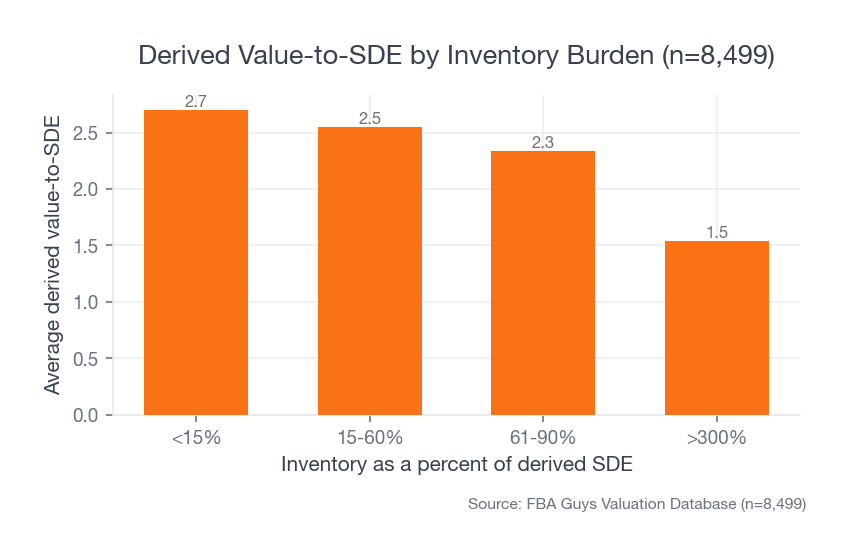
In the FBA Guys valuation database, businesses with inventory below 15% of estimated SDE averaged 2.70 derived value-to-SDE across 2,401 valuations. Businesses with inventory above 300% of estimated SDE averaged 1.54 across 1,417 valuations. That gap is too large to treat inventory as a back-office chore.
 Source: FBA Guys Valuation Database (n=8,499)
There is a lesson in that number, although it is not a glamorous one. Inventory management is capital allocation wearing a warehouse vest.
Amazon FBA inventory management best practices start with balance
The best inventory system is not the one with the fastest turnover in every situation.
That surprised us more than the stockout data did.
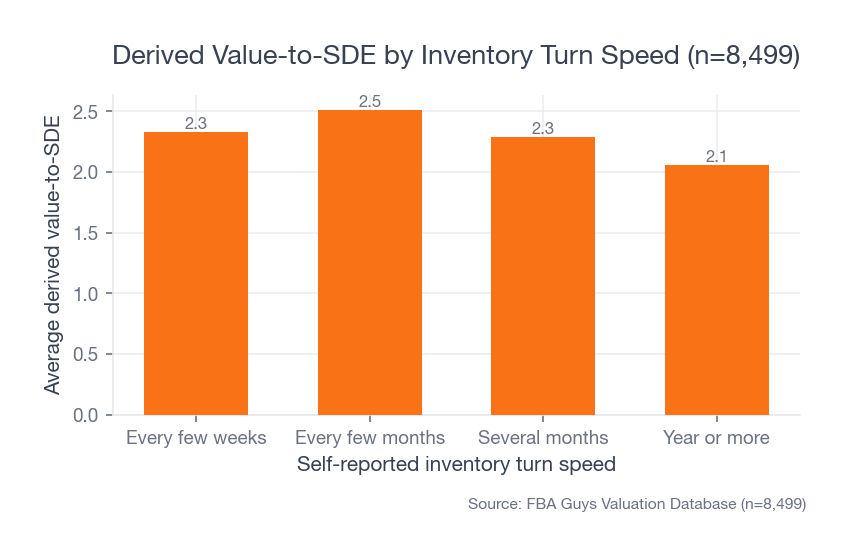
Businesses in our database that turned inventory every few months averaged 2.51 derived value-to-SDE across 4,185 valuations. Businesses turning inventory every few weeks averaged 2.33 across 2,682 valuations. The year-or-more group was weaker at 2.06, which makes sense. Inventory that sits for a year starts to feel less like an asset and more like a storage subscription with packaging.
 Source: FBA Guys Valuation Database (n=8,499)
The middle bucket is where the interesting work is. Turning every few months can mean the business has enough stock to survive lead-time noise without carrying so much inventory that the cash cycle gets heavy.
Every few weeks can be excellent for the right SKU. It can also mean you are ordering constantly, cutting safety stock too thin, and hoping Amazon receiving doesn't take a long weekend at exactly the wrong time.
The fact is, the best inventory position is usually a controlled range, not a single target. You want enough stock to keep your popular products buyable, enough restraint to avoid stale inventory, and enough visibility that a reorder decision doesn't depend on whoever last opened the spreadsheet.
Know the four numbers before you reorder
A reorder decision needs four numbers:
- Average daily unit sales
- True lead time from purchase order to available FBA inventory
- Safety stock
- Cash required to place the next order
That last one gets skipped too often.
A reorder point can look perfect in units and still fail in dollars. If the SKU needs 1,200 units reordered, the supplier wants a 30% deposit, freight is due before arrival, and Amazon fees have moved since the last order, the operational answer and the cash-flow answer may not match.
This is why we like connecting inventory planning to unit economics. Before you reorder, know whether the SKU still works after product cost, freight, duties, storage, fulfillment, advertising, returns, and whatever small fee line you keep pretending is harmless because it arrives in pieces. If you haven't done that work, start with Amazon FBA unit economics before the next big purchase order.
To illustrate: a seller can have 45 days of stock, a 60-day landed lead time, and a supplier who only starts production after deposit. The spreadsheet may say there is time. The supplier calendar says otherwise.
Tiny difference. Expensive difference.
Use reorder points, not memory
A reorder point is the inventory level where you need to place a new order so stock arrives before you run out.
The simple formula is:
Reorder point = average daily sales x lead time in days + safety stock
For Amazon FBA, lead time should run all the way to sellable inventory, not just arrival at a port, warehouse, or prep center. Production time counts. Freight counts. Prep counts. Amazon receiving counts. The weird week where units are in FC transfer and technically present but not helping you also counts, because customers can't buy an internal transfer.
Use the reorder point calculator when you want the math clean. Then look at the answer like an operator.
Does the reorder quantity fit your MOQ? Does it create storage pressure? Does it require cash you need for ads next month? Does it assume a lead time that only happened once, during the supplier's best month, when nobody in the chain was on holiday?
Honestly, this is where simple systems beat elaborate ones. A monthly review that updates daily sales, lead time, safety stock, and cash required will outperform a pretty dashboard nobody trusts.
Keep safety stock without turning inventory into dead cash
Safety stock is buffer inventory for demand spikes, production delays, freight problems, and Amazon receiving delays.
It is not a license to overbuy.
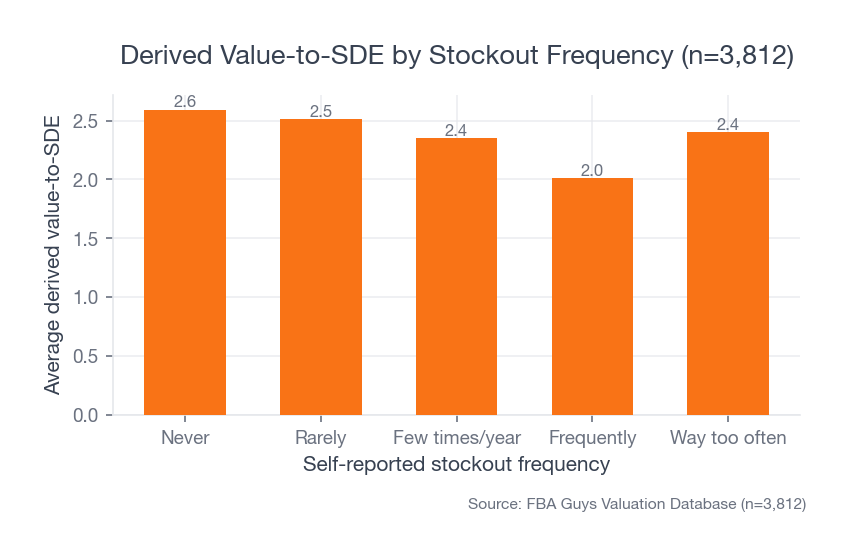
In our data, businesses reporting no stockouts averaged 2.59 derived value-to-SDE across 1,078 valuations. Businesses reporting frequent stockouts averaged 2.01 across 256 valuations. Stockouts matter.
 Source: FBA Guys Valuation Database (n=3,812)
Then the other side shows up. Businesses carrying inventory above 300% of estimated SDE still averaged only about 1.57 to 1.60 in our cross-tab even when they rarely or never stocked out. Avoiding stockouts by swallowing the business in inventory doesn't solve the problem. It moves the problem into cash, storage, aging, and purchase-price structure.
This is the uncomfortable middle of FBA inventory planning. Sorry, no elegant slogan here.
You need enough stock to keep the listing alive. You also need enough cash to keep the business alive. Those two needs are friendly right up until a container, an MOQ, and a slow-moving variation all show up in the same month.
Watch stockouts and overstock together
Amazon's own inventory management guidance points sellers toward the same balance: reduce excess inventory, improve sell-through, fix stranded inventory, and keep popular products in stock. Amazon's public inventory guide also defines sell-through as units sold divided by units received and describes stranded inventory as sellable inventory that customers can't buy because it isn't attached to an active listing.
Those are useful definitions. They are also platform definitions.
For valuation and operating quality, we care about the combined pattern:
- Stockouts tell you where demand outran the system.
- Overstock tells you where confidence outran demand.
- Stranded inventory tells you where process broke after the inventory already existed.
- Aged inventory tells you where the original buying decision got stale.
Read them together. A SKU with strong margin, frequent stockouts, and clean reorder economics might need a larger buy. A SKU with the same stockout history but weak contribution margin may need price, ads, or assortment work before you throw more cash at it.
This is also where the low-inventory-level fee and monthly versus long-term storage fees become useful signals. The fee itself may be small compared with the business pattern underneath it.
We don't love fee tables as strategy documents. They are receipts.
Build the supplier side of the system
Reorder math assumes the supplier behaves.
That is a bold assumption.
The database gives us a useful hint here. Businesses with backup vendors averaged 2.50 derived value-to-SDE across 4,944 valuations. Businesses without backup vendors averaged 2.27 across 3,555 valuations. The data doesn't prove the backup vendor created the value. It does suggest the stronger businesses tend to have more supply-side optionality.
Your inventory system should include supplier facts, not just SKU facts:
- Current lead time by supplier
- MOQ by SKU and by order
- Deposit and payment timing
- Freight mode and normal transit range
- Backup supplier status
- Last quote date
- Quality issue history
One messy detail we like seeing is a reorder sheet with supplier notes in plain language. "Factory closed last week of January." "Carton changed in March, dim weight needs recheck." "Backup vendor sample passed color but failed zipper pull." None of that belongs in a polished KPI dashboard. All of it can save a reorder decision.
The buyer side notices this too. Supplier concentration matters less when supplier replaceability is real. A single supplier with documented specs, backup quotes, and tested samples is a different risk profile from a single supplier whose only backup plan is an old Alibaba bookmark.
SKU count has a sweet spot
Catalog breadth helps until it becomes catalog clutter.
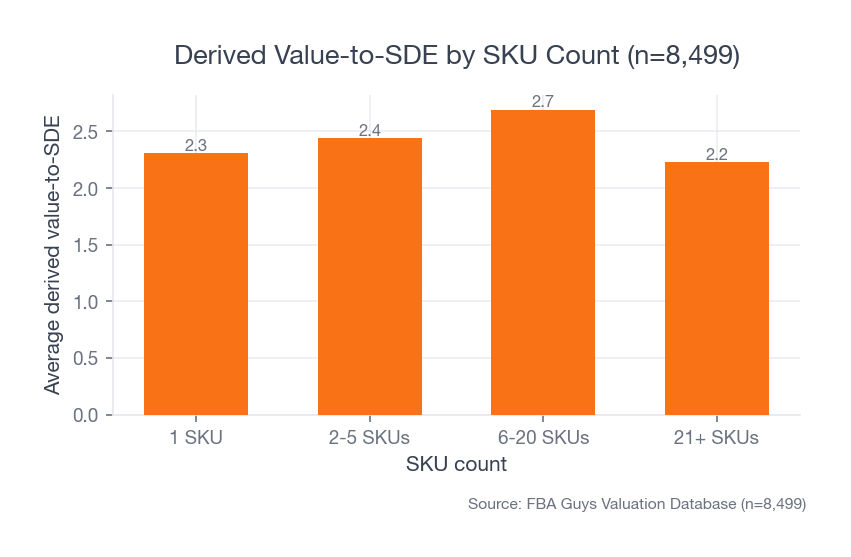
In our data, single-SKU businesses averaged 2.31 derived value-to-SDE across 664 valuations. Businesses with 2-5 SKUs averaged 2.44. The 6-20 SKU group was strongest at 2.69 across 2,309 valuations. Then the 21+ SKU group dropped to 2.23 across 3,891 valuations.
 Source: FBA Guys Valuation Database (n=8,499)
That pattern keeps showing up around FBA quality. One SKU is fragile. A few SKUs can be clean. A focused catalog can diversify risk while still being manageable. A sprawling catalog can hide weak turns, stale variants, uneven contribution margin, and buying decisions nobody wants to defend six months later.
This is why inventory management should happen at SKU level, not only account level.
Account-level inventory may look fine while three SKUs carry the cash burden. A blended margin can look healthy while one variation eats storage and another drives the profit. Total inventory value can look reasonable while the wrong ASINs are out of stock.
Run the SKU list. Sort by inventory dollars. Sort by days of supply. Sort by contribution margin. Sort by stockout history.
Then ask which products deserve more cash.
Use Amazon's inventory tools without outsourcing judgment
Amazon gives sellers useful inventory tools in Seller Central. Current public FBA materials describe the FBA Dashboard, FBA Restock tool, replenishment alerts, inventory age reporting, and the Inventory Performance Index as tools for managing sell-through, excess inventory, stranded inventory, and popular-product availability.
Use them.
Just don't confuse Amazon's recommendation with your business decision.
Amazon sees platform demand, fulfillment capacity, and its own operational model. You see supplier terms, freight timing, cash availability, seasonality, margin, and whether the SKU still belongs in the catalog. Those are different views of the same inventory.
The clean workflow is simple:
- Use Amazon's dashboard to catch operational issues: low stock, excess stock, stranded inventory, aged inventory, receiving status.
- Use your own reorder model to decide purchase timing and quantity.
- Use unit economics to decide whether the SKU deserves the cash.
- Use cash-flow planning to decide whether the order fits the next 30-90 days.
This is also where an inventory ROI calculator earns its keep. Inventory should be judged by the return it creates, not by how comforting the shelves look.
The weekly review should feel a little irritating
Good inventory review has a small amount of friction in it.
If the review feels too easy, you are probably looking at totals instead of decisions. Total units, total inventory value, and total inbound stock are useful, of course, but they don't tell you which SKU deserves the next dollar. They don't tell you which variation is hiding under a blended parent ASIN. They don't tell you whether last month's good margin came from real pricing power or from delaying a purchase order that still has to be placed.
So the weekly review should ask a few annoying questions.
Which SKU would hurt the business most if it stocked out next week?
Which SKU would you be least excited to reorder if the supplier invoice landed today?
Which SKU is only profitable because the last freight bill hasn't hit the books yet?
Which SKU looks healthy in Seller Central but ugly after storage, ads, returns, and landed cost?
Which SKU has enough demand to deserve capital, and which one is being kept alive because deleting it would feel like admitting the launch didn't work?
These questions slow the review down in the right place. They move the conversation from "Do we have inventory?" to "Do we like the inventory we have?"
That distinction matters more as the catalog gets larger. A five-SKU business can usually be understood by memory for a while, although memory is a terrible system and it always sends the invoice later. A 40-SKU business can't run that way. At that size, the bad decisions don't announce themselves. They hide inside average margin, average days of supply, average storage cost, and average sales velocity until the business has a lot of average-looking numbers and a cash balance that feels oddly thin.
The review doesn't need theater. It needs the same questions asked at the same interval, with enough discipline that a weird answer gets investigated before it becomes normal.
If your best SKU is approaching reorder point, what is the full cash requirement to replace it?
If your slowest SKU has 180 days of supply, what would have to be true for you to buy it again?
If Amazon recommends a replenishment quantity, does that quantity still make sense after MOQ, freight timing, and your next tax payment?
This is where inventory management becomes less about stock and more about judgment. You aren't trying to make every SKU look efficient. You are trying to decide which SKUs deserve more of the business.
Track inventory like a buyer will eventually read it
Even if you don't plan to sell soon, inventory records should be clean enough that someone else could understand them.
For an FBA business, that usually means your inventory records reconcile across three views:
- Financial statements
- Seller Central inventory reports
- Physical inventory or 3PL records outside Amazon
If those don't tie together, every other number starts to wobble. Gross margin gets harder to trust. SDE gets harder to explain. Working capital gets harder to negotiate. Inventory value at closing gets harder to defend.
We have a separate guide on how to value inventory for Amazon FBA, but the short operating version is this: track landed cost, sellable status, location, age, and expected movement. Landed cost matters because product cost alone leaves out freight, duties, prep, and other costs required to get the unit ready for sale.
This is dull work.
Good. Dull inventory records are a gift. Nobody wants creative inventory accounting when real money is moving.
A practical Amazon FBA inventory management checklist
Use this monthly. Weekly for fast-moving catalogs.
- Export your FBA inventory view and identify low-stock, stranded, aged, and excess inventory.
- Update average daily unit sales by SKU using a trailing period that matches the product's sales pattern.
- Update landed lead time from purchase order to sellable FBA stock.
- Recalculate reorder points for replenishable SKUs.
- Compare reorder quantities against MOQ, storage cost, and available cash.
- Review contribution margin before approving any reorder.
- Flag SKUs with stockouts, slow turns, or margin compression.
- Check supplier lead-time changes, backup vendor status, and payment terms.
- Reconcile inventory value across books, Seller Central, and any 3PL or warehouse records.
- Decide which SKUs deserve cash, which need a smaller buy, and which should be cleared out.
The reorder point is the calculation. The monthly review is the discipline.
FAQ
What are the most important Amazon FBA inventory management best practices?
The most important practices are using SKU-level reorder points, tracking real lead time to sellable FBA stock, keeping safety stock without overbuying, monitoring stockouts and excess inventory together, and reconciling inventory value across your books and Seller Central.
The list sounds ordinary because good inventory management usually is ordinary. The expensive mistakes come from letting ordinary work drift.
How do I know when to reorder Amazon FBA inventory?
Reorder when current available inventory reaches your reorder point: average daily sales multiplied by full landed lead time, plus safety stock. For FBA, lead time should include supplier production, freight, prep, Amazon receiving, and any normal delay before units become sellable.
If the math says reorder but the SKU's margin no longer works, pause before buying. Inventory planning without margin review is how slow mistakes get funded.
Is it worse to stock out or overstock?
Both can be expensive, and the worse one depends on the SKU. In our valuation data, frequent-stockout businesses averaged 2.01 derived value-to-SDE, while no-stockout businesses averaged 2.59. But businesses carrying inventory above 300% of estimated SDE averaged only 1.54, which shows how costly overbuying can become.
The practical answer is to manage the range. Too little inventory loses sales and rank. Too much inventory traps cash and adds storage risk.
How often should I review FBA inventory?
Review inventory weekly for fast-moving SKUs and monthly for the full catalog. A weekly review should catch low stock, stranded inventory, inbound delays, and abnormal sales movement. A monthly review should update reorder points, margin, landed cost, supplier lead time, and cash requirements.
Fast checks prevent surprises. Monthly reviews prevent slow decay.
Should I use Amazon's restock recommendations?
Use them as one input. Amazon's tools can help flag low stock, excess inventory, stranded listings, sell-through, and inventory age. Your final reorder decision should also include supplier lead time, MOQ, cash position, contribution margin, seasonality, and whether the SKU still deserves capital.
Amazon can help forecast demand. It can't decide how much working capital your business should risk on a SKU.
The closer
The best Amazon FBA inventory management system doesn't make inventory exciting.
It makes inventory explainable.
Typically, the best sign is not a perfect dashboard. It is a reorder decision you can explain six weeks later, after the cash has moved and the units are finally sellable.
You know what is selling, what is aging, what needs to be reordered, what should be left alone, and how much cash is tied up in the decision. You can show the math to a bookkeeper, a buyer, a lender, or your own tired future self on a Thursday afternoon when a supplier asks for a deposit.
That is the point. Boring inventory is usually the inventory that lets the rest of the business breathe.
Curious what your business is worth?
Get a free, instant valuation and see how your Amazon business stacks up.
Get Your Free Valuation