Amazon Late Shipment Rate Improvement: Fix the Promise Before the Metric
The FBA Guys
June 25, 2026

A late shipment warning usually feels like a carrier problem until you pull the order report.
Then the pattern gets more specific. One SKU was still set to seller-fulfilled after a stockout. A third-party tool confirmed late. A Friday pickup moved earlier, but the warehouse kept packing to the old cutoff. The label existed, but the confirmation didn't. The promise in Seller Central was cleaner than the process behind it.
Amazon late shipment rate improvement starts with that gap. LSR is a seller-fulfilled shipping metric that looks at orders confirmed after the expected ship date, measured against total seller-fulfilled orders over Amazon's current rolling windows. The current public target is under 4% for seller-fulfilled offers, but the live Seller Central late shipment rate page is the source to check before acting.
The useful work is making the promised ship date match the warehouse's real capacity, then keeping a record that proves the same miss won't repeat.
That sounds plain because it is.
What Amazon Late Shipment Rate Measures
Late shipment rate applies to seller-fulfilled orders. It doesn't apply to FBA orders where Amazon controls the fulfillment process.
That distinction catches hybrid sellers. You may think of the business as an FBA business because most of the revenue runs through Amazon's fulfillment network, but a few active FBM offers can still create a seller-fulfilled metric problem. A small number of late seller-fulfilled confirmations can move the percentage quickly when the order count is low. The wider FBA versus FBM tradeoff is a separate question, but it is worth understanding if merchant fulfillment is becoming more than a backup path.
If you had 25 seller-fulfilled orders in the relevant window, one late confirmation is already 4%. Two is 8%. The math isn't subtle, but it becomes easy to miss when FBM is only a side door in the account.
The current Seller Central framing is about confirmation timing against the expected ship date. So the first diagnostic question is whether shipment was confirmed on time for the promise Amazon showed on that order.
That is why buying a label isn't always enough. If the label was created but the shipment was confirmed late, the metric can still move against you. If the package was packed but missed the carrier pickup, the metric doesn't care that the warehouse was busy. If the offer promised a handling time the team could not keep, the metric records the promise failure.
Why LSR Improvement Starts Before the Label
Most late-shipment fixes arrive too late because they start at the moment someone is buying postage.
By then, the real decision may already have been made. The SKU was active. The offer was seller-fulfilled. The handling time was set. The transit template was attached. The cutoff time was assumed. The order came in. The warehouse had the same number of people it had yesterday.
The label is only the receipt for those earlier choices.
Amazon's FBM guidance points sellers toward handling time, transit time, and capacity limits that match the operation. That is a better frame than trying to decide whether a carrier excuse is convincing. The seller has to ask whether Seller Central is promising a shipping rhythm the business can actually run.
There is a tradeoff here. Longer handling time can make the offer less attractive. A slower promise may reduce conversion. But a faster promise that repeatedly creates late confirmations isn't free. It buys a stronger front-end offer with back-end account-health risk.
The answer isn't to make every offer slow. The answer is to stop treating one shipping setting as if it describes every SKU, day, warehouse, and staffing pattern.
Some SKUs can ship same day. Some can ship next day. Some should never be seller-fulfilled unless inventory is physically in the right place. Some can handle a tight promise Monday through Thursday but fail on Friday because the carrier pickup moves earlier. That last case is an operations setting asking for more precision than the operation has given it.
The better fix is to make the promise smaller until the process earns a faster one.
Pull the Orders That Created the Metric
The first working file is the Late Shipment Rate report.
Pull the affected order IDs. For each one, record the SKU, ASIN, marketplace, order date, expected ship date, actual ship-confirmation date, carrier, shipping service, fulfillment template, handling-time setting, warehouse or prep location, and who owned the order that day.
Then add one more column: cause.
This is where the metric starts to become useful. The late orders usually separate into a few groups:
- The offer shouldn't have been seller-fulfilled.
- Handling time was too short.
- The shipping template had the wrong transit assumption.
- The warehouse cutoff missed the carrier pickup.
- Inventory was not where the system said it was.
- A third-party tool failed to sync or confirm.
- The label was purchased, but confirmation didn't happen.
- A weekend, holiday, or staffing gap exposed an assumption.
- The carrier missed pickup after the internal process had already waited too long.
Those causes lead to different fixes.
If the offer shouldn't have been seller-fulfilled, the fix is offer control. Check the listing, restock rule, automation, and any software that can flip fulfillment method.
If handling time was too short, the fix is promise control. Change the setting, then tighten it later only after the report stays clean.
If the cutoff missed carrier pickup, the fix is calendar control. The warehouse needs a visible cutoff that is earlier than the carrier's real behavior, not the behavior printed on an old SOP.
If a tool failed to sync, the fix is confirmation control. Someone needs to know where confirmation status is checked and what happens when the integration is delayed.
If inventory was not where the offer thought it was, the fix is inventory routing. That may be a stock-location issue, a multi-location inventory issue, or an offer that should be paused when units aren't physically ready to ship.
The important part is that the order report keeps the response honest. It is hard to write a vague carrier explanation when half the late orders were caused by an offer that should have been paused. It is hard to blame staffing when the only late orders came from one template. It is hard to treat the issue as random when every miss happened after a 3:00 p.m. pickup.
The orders will usually tell you where to start.
Fix Handling Time Before You Fix Carrier Choice
Carrier choice matters, but handling time usually deserves the first look.
Handling time is the promise before the shipping service ever touches the package. If that promise is wrong, a better carrier can only hide the problem for a while. The seller may still be late before the package enters the carrier network.
A practical audit starts with three questions:
- What is the latest time an order can enter the system and still ship on time?
- Who is responsible for confirming that every due-today order has been shipped and confirmed?
- Which SKUs or templates are exceptions to the normal workflow?
If the answer to the first question is "usually around 3:00," the promise isn't ready. If the answer to the second question is "the warehouse team," no one owns the metric. If the answer to the third question lives in someone's head, the setting will drift.
This is where capacity limits help. If the team can comfortably handle 40 seller-fulfilled orders per day and accuracy breaks at 55, the account shouldn't behave as if capacity is unlimited. If a single employee prints labels and that person is out on Fridays, the Friday process needs a backup or a different promise. If a fragile SKU takes an extra inspection step, it shouldn't inherit the same handling time as a simple reorder item.
We don't know your exact conversion cost from adding time. That has to be tested inside the business. But we would rather see a seller give up a little speed on the promise than preserve speed by creating repeated account-health noise.
Once the report is clean, tighten carefully. Start with SKUs that have stable inventory, simple packaging, and carrier pickup you can prove. Keep slower settings where the process is still conditional.
When Amazon Buy Shipping Helps
Amazon Buy Shipping can remove a few failure points. It can purchase labels, automatically confirm and track shipments, and filter shipping methods based on delivery reliability. Those are useful advantages when the late-shipment problem is partly a confirmation, tracking-data, or service-selection problem.
It can also make the workflow easier to audit. If labels and tracking live closer to Seller Central, there is less translation between systems.
But Buy Shipping doesn't make a late warehouse early. It doesn't move inventory into the right bin. It doesn't make a 4:30 p.m. packing habit compatible with a 3:00 p.m. pickup. It doesn't fix a SKU that shouldn't have been active as seller-fulfilled.
Use Buy Shipping where it reduces confirmation and tracking risk. Keep the rest of the operating discipline anyway.
The same principle applies to third-party shipping tools. A good tool can help a clean process run faster. It can also make a bad process harder to see if no one checks whether confirmations actually reached Amazon.
If Your LSR Is Already Above the Target
The first job is to stop new misses.
Open the current seller-fulfilled order queue. Look at today and tomorrow. Identify every order due to ship and decide whether it can actually ship and be confirmed on time. If one SKU or template is still creating risk, fix it before more orders enter the window.
Then preserve the record. Download the LSR report. Save screenshots from Account Health. Keep the affected order list. Write the cause next to each order while the details are still fresh.
If Amazon asks for a response, answer the specific issue. A good response is plain: what happened, which orders were affected, what setting or process changed, who owns the prevention step, and how the account will be monitored until the metric clears.
Don't send a generic apology if the report shows a specific operating cause. Don't blame the carrier if the ship-confirmation timestamp was late because the internal cutoff was wrong. Don't promise "more training" if the real fix is a handling-time change.
The rolling window should improve as late orders age out and new seller-fulfilled orders are shipped and confirmed on time. The exact timing belongs to the live Amazon metric view. Keep watching it until the report proves the process is holding.
How LSR Fits Into Account Health
A late-shipment issue is easiest to fix when it is still a metric issue.
It becomes harder when it turns into a performance notification, an account-health warning, a repeated pattern, or a record no one can explain six months later. That is the business reason to treat LSR improvement as a file, not just a dashboard percentage.
The FBA Guys valuation database doesn't store exact LSR, so we can't build a late-shipment-to-valuation formula. The adjacent account-health data is still useful.
In 8,593 successful valuations with usable SDE data, FBA records averaged 2.51 derived value-to-SDE, hybrid records averaged 2.21, and FBM records averaged 1.90. That doesn't prove seller fulfillment caused the lower number, and it certainly doesn't prove late shipment rate caused it. It does show that seller-fulfilled complexity sits in a different risk context than a pure FBA workflow. The related Amazon FBA vs FBM cost comparison covers that fulfillment choice in more detail.
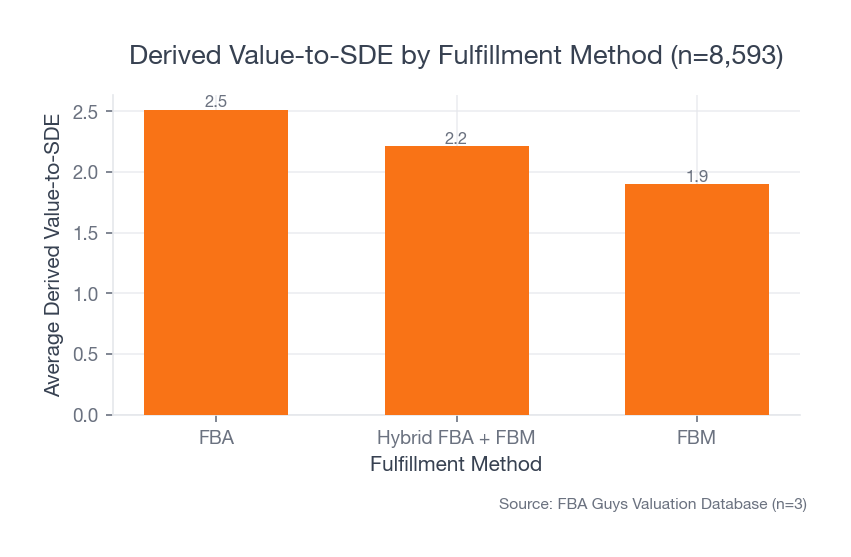 Source: FBA Guys Valuation Database (n=8,593 successful valuations with usable SDE data)
The newer account-health subset is narrower. It has 445 successful records. In that subset, warning-only histories averaged 2.77 derived value-to-SDE, close to never-suspended records at 2.79. Resolved suspensions averaged 2.41. Active issues had only six records, too small for much inference. For the broader score context, see the Amazon Account Health Rating guide.
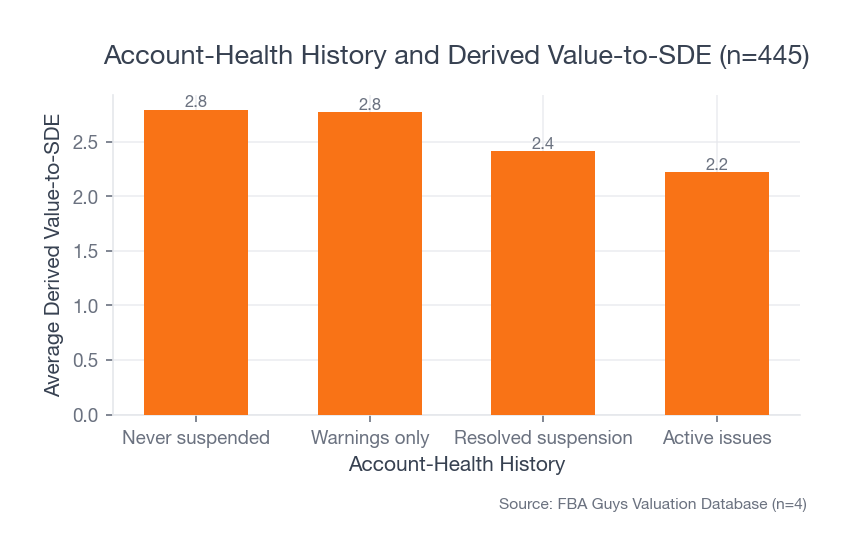 Source: FBA Guys Valuation Database (n=445 successful records with populated suspension-history data)
The useful reading is that a handled warning and a suspension history are different business facts. Some warnings are serious.
That is why the LSR record matters. If someone later asks what happened, the strongest answer is a file:
Here are the late orders. Here is the cause. Here is the old setting. Here is the new setting. Here is the clean monitoring history after the change.
That kind of answer doesn't make platform risk disappear. It makes the risk visible enough to evaluate.
Build a Weekly LSR Control File
The weekly file doesn't need to be elaborate. It needs to be consistent.
Keep one row per week with the current LSR, pre-fulfillment cancellation rate, valid tracking rate, on-time delivery rate, open performance notifications, seller-fulfilled order count, late order count, and any fulfillment-template changes.
Then keep a second tab for incidents. For each late order or warning, save the order ID, SKU, promised ship date, confirmation date, root cause, action taken, owner, and follow-up date.
If the business uses FBM only as a backup during FBA stockouts, add a stockout trigger. Which SKUs are allowed to flip to FBM? Where is the inventory? Who approves the change? What handling time applies? When does the offer flip back?
If the business uses FBM as a normal channel, add a warehouse trigger. What is the daily capacity? What is the real carrier pickup time? Who checks due-today orders? What happens if the shipping tool is down? What is the weekend rule?
This is ordinary documentation. That is why it works.
The Playbook's documentation and due-diligence logic applies here even if you aren't preparing to sell. A business that can explain its account-health record is easier to operate than one that has to reconstruct every warning from memory. If you already run a weekly operating review, LSR belongs next to the other Amazon KPIs you track.
FAQ
What is a good Amazon late shipment rate?
Amazon's current public seller-policy guidance points to keeping LSR under 4% for seller-fulfilled offers. Check the live Seller Central page before acting because Amazon can change policy details.
How do I reduce late shipment rate on Amazon?
Download the LSR report, identify the late orders, sort them by cause, fix the promise-setting workflow, and monitor the rolling window until clean orders replace the late ones. Most fixes involve handling-time settings, cutoffs, shipping templates, capacity limits, inventory routes, or confirmation workflow.
Does late shipment rate apply to FBA?
LSR applies to seller-fulfilled orders. FBA orders are fulfilled by Amazon, but hybrid accounts can still have LSR exposure if any seller-fulfilled offers are active.
Will Amazon Buy Shipping prevent late shipment rate problems?
It can help with label purchase, confirmation plus tracking data, and service selection. It doesn't fix a warehouse that misses cutoff or an offer with unrealistic handling time.
What should I do if Amazon asks for a plan of action for late shipment rate?
Answer with order-level facts. State what happened, which orders were affected, what changed in the workflow, who owns the fix, and how you'll monitor the metric. Avoid generic carrier blame if the late-order report points to an internal cause.
Keep the Metric Boring
Late shipment rate improvement isn't glamorous work. It is promised ship date, actual confirmation date, cutoff time, promised handling time, capacity, and weekly review.
That is exactly why it deserves attention.
When seller-fulfilled volume is small, one late order can move the percentage. When the business is hybrid, an FBM side process can surprise an FBA-first operator. When an account-health record exists, someone may ask for the story later.
Make the promise honest. Ship and confirm inside the promise. Save the record.
That is the version of LSR improvement you want to have to explain.
Curious what your business is worth?
Get a free, instant valuation and see how your Amazon business stacks up.
Get Your Free Valuation