Amazon Pre-Fulfillment Cancel Rate: Fix the Promise Before the Order Exists
The FBA Guys
July 23, 2026

A pre-fulfillment cancellation usually starts before anyone clicks Cancel.
The quantity was wrong. The SKU was still active as seller-fulfilled after inventory moved back to FBA. A sync tool held an old count. A warehouse knew it couldn't ship the unit, but Seller Central still thought the offer was available. The order arrived after the promise had already drifted away from the operation.
Amazon pre-fulfillment cancel rate is the percentage of seller-fulfilled orders the seller cancels before fulfillment during Amazon's current measurement window. The current public Seller Central cancellation-rate target is under 2.5%, and sellers should check the live Amazon page before acting because account-health rules can change.
The useful work isn't writing a better apology after the cancellation. It is finding the promise that made the cancellation possible: inventory availability, fulfillment method, quantity sync, handling time, or confirmation ownership.
What Amazon Pre-Fulfillment Cancel Rate Measures
Pre-fulfillment cancel rate applies to seller-fulfilled orders. FBA orders are fulfilled by Amazon, so the metric isn't about normal FBA fulfillment. The broader FBA versus FBM cost comparison is a separate operating question.
That distinction is simple until a mostly FBA account has a few merchant-fulfilled offers running in the background. A backup FBM offer, a stranded-inventory workaround, a seasonal merchant-fulfilled SKU, or an accidental fulfillment-method flip can create cancellation-rate exposure inside an account the seller thinks of as FBA-first.
Amazon's current public explanation treats the metric as seller-cancelled orders divided by total orders during a 7-day period. Seller-initiated cancellations count. Amazon auto-cancellations caused by the seller not confirming shipment can count. Customer-requested cancellations through the customer's Amazon account and pending orders cancelled directly by the customer are treated differently.
The denominator is what makes the metric jump.
If you had 40 seller-fulfilled orders in the window, one seller-cancelled order is 2.5%. Two is 5%. The broader account may have hundreds of FBA orders, but the cancellation-rate math is looking at the seller-fulfilled lane.
Some Amazon programs and promotion paths can be stricter than the general account-health target. Seller-fulfilled price discounts and certain deals have used lower pre-fulfillment cancellation-rate eligibility thresholds. Treat those as program-specific rules, and check the active Seller Central page before planning a promotion.
Why Cancellation Rate Starts Before the Order Is Cancelled
The cancellation is late evidence of an earlier mismatch.
The SKU was live. The quantity was available. The fulfillment method was seller-fulfilled. The handling time was attached. The order came in. Only then did someone discover the unit wasn't ready to ship.
By the time the team is choosing whether to cancel, the best fix may already be gone. The next useful question is where the false promise entered the account.
There are only a few usual places:
- Inventory quantity was wrong.
- Inventory was in the wrong location.
- The offer should have been FBA only.
- A backup FBM offer stayed active too long.
- A third-party sync tool pushed stale quantity.
- A replenishment delay left the offer live.
- The SKU needed prep, inspection, bundling, or labeling before shipment.
- The order was not confirmed in time and Amazon auto-cancelled it.
Those causes need different fixes. A stockout needs availability control. A wrong fulfillment method needs offer control. A tool-sync failure needs a reconciliation step. A prep delay needs a handling-time or workflow change.
A generic "we will train the team" response doesn't explain any of that.
Pull the Report and Sort Every Cancellation by Cause
The first working file is the cancellation-rate report.
Pull the affected order IDs. For each order, record the order date, SKU, ASIN, marketplace, cancellation date, cancellation type, fulfillment method, quantity available when the order arrived, inventory location, handling time, shipping template, software source, and who owned the order that day.
Then add the column that matters: cause.
Use plain categories:
- Seller cancelled because inventory wasn't available.
- Seller cancelled because inventory existed but wasn't ship-ready.
- Seller cancelled because fulfillment method was wrong.
- Seller cancelled because a supplier or replenishment assumption failed.
- Seller cancelled because a tool showed stale quantity.
- Amazon auto-cancelled because shipment wasn't confirmed.
- Customer requested cancellation through Amazon.
- Pending order cancelled by customer.
The last two categories should be separated from seller-caused cancellation work. The report may still deserve review, but the operating fix is different.
This sorting step keeps the response honest. If every affected order came from one SKU, fix that SKU. If every cancellation came after an inventory-sync delay, fix the sync check. If one warehouse location created the problem, pause that location until the count can be trusted.
The orders usually show the shape of the problem faster than the dashboard percentage does.
Fix Inventory Availability Before You Write a Plan of Action
Most pre-fulfillment cancellation work is inventory-promise work.
Start with current risk, not historical explanation. Open the seller-fulfilled order queue. Check every order due today and tomorrow. Confirm that the unit exists, is sellable, is in the right location, can be packed, can be shipped, and can be confirmed inside the promise.
Then check the active seller-fulfilled offers. Any SKU with uncertain quantity should be paused or reduced to a controlled buffer. Any SKU that depends on FBA inventory being moved somewhere else should be treated as unavailable until the unit is physically ready for merchant fulfillment.
Quantity buffers matter here. A listing that shows all available units to Amazon leaves no room for a damaged unit, a marketplace sync lag, a misplaced bin, or one unit reserved by another channel. If the business sells the same inventory across Amazon, Shopify, Walmart, wholesale, or a manual invoice process, the Amazon quantity shouldn't pretend the whole shelf belongs to one channel.
Handling time deserves its own review, but don't let it hide the inventory issue. A longer handling time can reduce auto-cancel and late-shipment risk when the process needs more time. It doesn't solve a bad count.
The clean sequence is: verify availability, control quantity, confirm fulfillment method, then adjust handling time where the process actually needs more time.
Hybrid FBA and FBM Accounts Need a Separate Control
Hybrid accounts are where this metric gets easiest to miss.
In the FBA Guys valuation database, fulfillment method shows up as a meaningful operating context. Among 8,555 successful valuations with usable calculated SDE and ratios between 0.5 and 10, FBA records had a 2.68 median derived value-to-SDE. Hybrid records had a 2.22 median. FBM records had a 1.64 median.
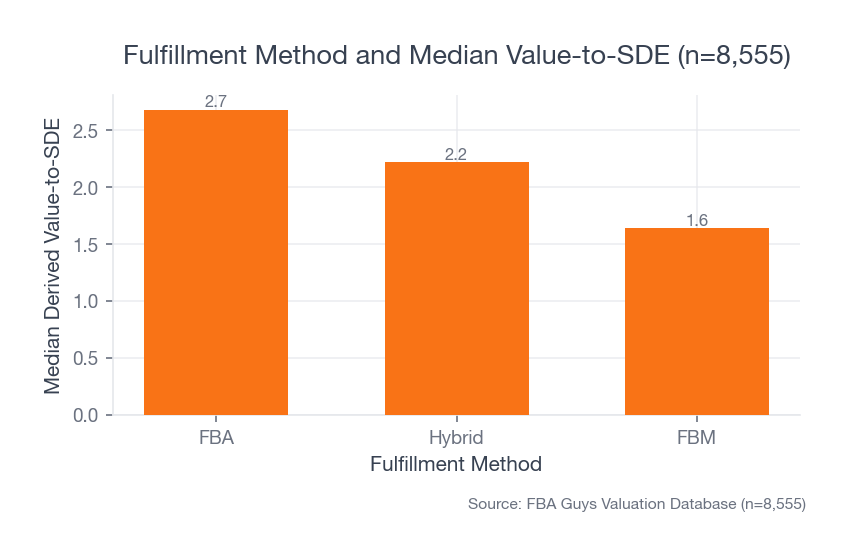 Source: FBA Guys Valuation Database (n=8,555 successful valuations with usable calculated SDE)
That doesn't prove FBM caused a lower valuation, and it certainly doesn't prove pre-fulfillment cancellation rate caused it. The cleaner reading is that merchant-fulfilled exposure often travels with a different operating burden than pure FBA.
Stockout data points in the same direction. Never-stockout records had a 2.72 median derived value-to-SDE. Rarely-stockout records had a 2.60 median. A few-times-per-year stockout records had a 2.37 median. Frequently-stockout records had a 1.87 median. The smallest extreme bucket was noisy, so we wouldn't build a neat curve from it. The related FBA inventory-management guide covers the replenishment side in more detail.
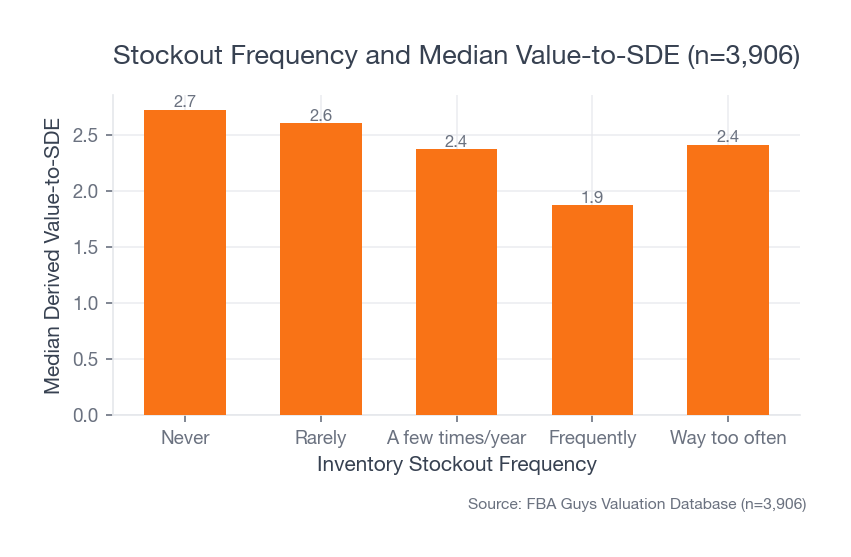 Source: FBA Guys Valuation Database (n=3,906 successful valuations with inventory-stock data and usable calculated SDE)
The practical lesson is still useful. Cancellation rate often begins as inventory that Seller Central thought was available before the operator could prove it.
For a hybrid account, create a separate FBM control list:
- Which SKUs are allowed to be seller-fulfilled?
- Why are they seller-fulfilled?
- Where is the inventory?
- What quantity buffer applies?
- Who can turn the FBM offer on?
- Who turns it off when FBA inventory returns?
- What handling time applies by SKU?
- What daily order volume can the warehouse actually handle?
If no one owns that list, FBM becomes a side process that can create a full account-health issue.
If Your Cancellation Rate Is Already Above Target
The first job is to stop new seller-caused cancellations.
Pause or reduce risky seller-fulfilled offers. Check current open orders. Fix any SKU where the available quantity, fulfillment method, or handling time is still wrong. Then download the report and preserve the evidence before memory starts editing the story.
If Amazon sends a performance notification, answer the actual cause. Use order-level facts:
- Which orders were affected.
- What caused the cancellation.
- Whether the cancellation was seller-initiated, auto-cancelled, customer-requested, or pending-customer-cancelled.
- What setting changed.
- What process changed.
- Who owns the daily check.
- How the account will be monitored until the metric clears.
Don't blame the customer if the report shows a seller cancellation. Don't blame Amazon if a third-party sync tool pushed stale inventory. Don't promise better monitoring without naming the report, owner, and cadence.
The rate should improve as cancelled orders age out of the window and clean seller-fulfilled orders replace them. The live Seller Central metric view is the place to watch that timing.
How Amazon Pre-Fulfillment Cancel Rate Fits Into Account Health
The valuation database doesn't store exact cancellation rate, so we can't build a cancellation-rate-to-valuation formula.
The adjacent account-health data is still useful.
In the 2026 account-health subset, warning-only histories had a 3.09 median derived value-to-SDE across 121 records, close to never-suspended histories at 3.12 across 243 records. Resolved suspensions sat lower at 2.42 across 78 records. Active issues had only six records, too small for much inference. The Amazon Account Health Rating guide covers the broader score context.
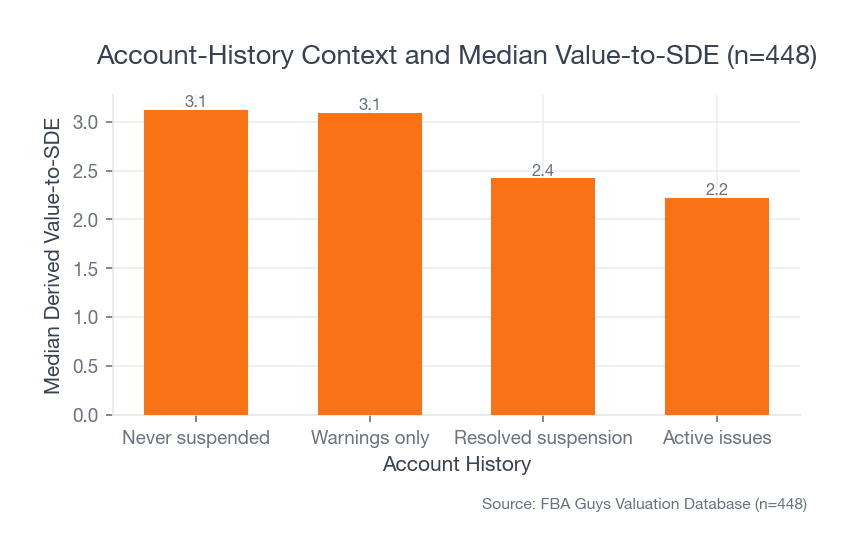 Source: FBA Guys Valuation Database (n=448 successful 2026 valuations with populated account-history data and usable calculated SDE)
The useful reading is that a handled warning and a suspension history are different business facts. Some warnings are serious, and the database can't see the exact cancellation-rate event behind them. But a clean file explaining what happened, what changed, and how the metric stayed clean afterward is a better future fact than a dashboard warning no one can explain.
SOP depth reinforces that. In the same 2026 subset, comprehensive SOP records had a 3.56 median derived value-to-SDE. Records with no SOP documentation had a 2.46 median.
That doesn't mean writing a cancellation SOP creates value by itself. Our read is more modest: businesses that can document and repeat their operating controls tend to show up differently from businesses where every account-health issue has to be reconstructed from memory.
Build a Weekly Cancellation-Control File
The file can be simple.
One tab tracks the weekly numbers, alongside the other Amazon FBA KPIs you review:
- Pre-fulfillment cancel rate.
- Seller-fulfilled order count.
- Seller-cancelled order count.
- Late shipment rate.
- Valid tracking rate.
- On-time delivery rate.
- Open performance notifications.
- Active seller-fulfilled SKUs.
- SKUs paused because quantity is uncertain.
The second tab tracks incidents:
- Order ID.
- SKU and ASIN.
- Cancellation date.
- Cancellation type.
- Root cause.
- Old setting.
- New setting.
- Owner.
- Follow-up date.
If the business uses seller fulfillment only as a backup, add an on/off rule. FBM turns on only when inventory is physically ready to ship. FBM turns off when the buffer falls below the threshold. FBA-first sellers need that rule because they are the most likely to forget the merchant-fulfilled lane exists.
If the business uses seller fulfillment as a normal channel, add a capacity rule. The warehouse needs a daily order limit, a real cutoff time, a backup for the person who confirms shipments, and a process for tool-sync failures.
This is ordinary operating documentation. That is why it works.
FAQ
What is Amazon pre-fulfillment cancel rate?
Amazon pre-fulfillment cancel rate is the percentage of seller-fulfilled orders cancelled by the seller before fulfillment during Amazon's current measurement window. Current Amazon guidance uses a 7-day period and points to a target under 2.5%.
Does pre-fulfillment cancel rate apply to FBA orders?
It applies to seller-fulfilled orders. FBA orders are fulfilled by Amazon, but hybrid accounts can still have exposure if any FBM offers are active.
What cancellations count against pre-fulfillment cancel rate?
Seller-initiated cancellations count. Amazon auto-cancellations caused by the seller not confirming shipment can count. Customer-requested cancellations through Amazon and pending orders cancelled directly by the customer are treated differently.
How do I reduce Amazon pre-fulfillment cancel rate?
Pull the cancellation report, sort every affected order by cause, stop new risky seller-fulfilled orders, fix the quantity or fulfillment setting that caused the cancellation, and monitor the metric until clean orders replace the cancelled ones.
Can one cancellation put my account above target?
Yes, if the seller-fulfilled order count is low. One cancellation out of 40 seller-fulfilled orders is 2.5%. One out of 20 is 5%.
Keep the Metric Boring
Amazon pre-fulfillment cancel rate is a small metric until the account starts making promises the operation can't keep.
The fix isn't dramatic. Make the quantity honest. Keep FBM offers intentional. Confirm that inventory is physically ready before the order exists. Give each SKU a handling time the process can actually meet. Save the report when something goes wrong.
If the issue comes up later, the answer should be easy to show: here are the orders, here is the cause, here is the changed setting, and here is the clean monitoring history after the fix.
Curious what your business is worth?
Get a free, instant valuation and see how your Amazon business stacks up.
Get Your Free Valuation