How to Reduce Amazon FBA Fees Without Teaching the Business Bad Habits
The FBA Guys
May 7, 2026

The fee table gets too much attention.
You can know the fulfillment fee on every SKU and still have an expensive FBA business. We see this in the numbers all the time: the product looks profitable at the unit level, then storage, placement, returns, aging inventory, and replenishment behavior quietly turn the margin into something thinner.
How to reduce Amazon FBA fees starts with this: lower the cost per unit, shorten the time each unit sits in the system, and keep enough inventory in the right place without letting FBA become a rented warehouse for slow decisions.
That sounds less satisfying than finding one trick in Seller Central. Fair. It is also how the money actually moves.
Start with the full fee stack
Amazon's public FBA materials describe the core cost categories clearly enough. Fulfillment fees cover picking, packing, shipping, customer service, and returns. Monthly storage fees are based on product size, volume, average daily units stored, dangerous goods status, and time of year. Aged inventory charges apply monthly once units have been stored in fulfillment centers long enough to trigger the surcharge. Amazon also charges for services such as removal, disposal, liquidation, and inbound placement when they apply.
As of the writing of this article, Amazon's 2026 seller forum announcement says US FBA fees increased by an average of $0.08 per unit sold, with no new FBA fee types in 2026, and most changes effective January 15, 2026. That headline number is small enough to ignore in a lazy model.
Do not ignore it.
A fee that looks small per unit becomes material when it lands on a SKU with weak margin, too much cubic volume, slow turns, high return rates, or too much inventory sitting in the wrong place. The table tells you the charge. The business tells you whether the charge is survivable.
What should you actually put in the model?
Use the fee table as the starting point, then add the pieces operators tend to keep in separate tabs: inbound freight, prep labor, placement estimates, storage by cubic foot, return processing, removals, reimbursements, advertising spend, discounting needed to move stale inventory, and the cash cost of holding units while you wait for them to sell. When those numbers live in different reports, each one looks manageable. When they sit beside contribution margin, a few SKUs start looking less charming.
This is why the better fee review begins with unit economics. A SKU can have a clean gross margin and still fail after Amazon's full system cost touches it. A SKU can also look expensive in FBA and still be worth keeping there because Prime conversion, service quality, and operational simplicity more than pay for the fee.
The inventory-to-SDE problem hiding inside FBA fees
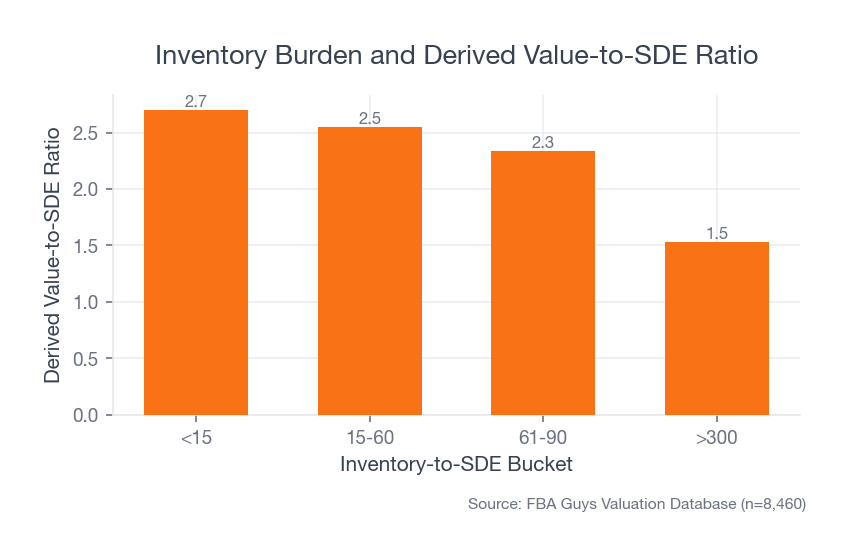
The clearest pattern in our valuation database wasn't a size tier. It was inventory burden.
Among 8,460 successful valuations, businesses with inventory-to-SDE under 15 averaged 57.1% margins, $46,214 in inventory, and a 2.70 derived value-to-SDE ratio. The 15-60 group averaged 44.6% margins and a 2.55 value-to-SDE ratio. The 61-90 group averaged 37.8% margins and 2.34.
Then the >300 bucket shows up: 34.7% average margin, $305,380 in average inventory, and a 1.53 derived value-to-SDE ratio.
 Source: FBA Guys Valuation Database (n=8,460)
There is a lot buried in that spread. Slow inventory doesn't just create storage fees. It ties up cash, makes replenishment decisions heavier, increases the odds of aged inventory, and creates a business that needs more working capital to produce each dollar of earnings.
If your FBA fee project only asks "How do I pay Amazon less this month?", it misses the larger signal. The better question is "Which inventory habits are making this business cost more to own?"
This is also where fee reduction starts overlapping with valuation. A business with lean, fast, predictable inventory gives a buyer a simpler working-capital problem. A business with inventory stacked months ahead of demand asks the next owner to fund the same mistake on day one. You can call that an Amazon fee problem if you want, but the fee is usually just the receipt.
Faster inventory turns make the same fee table feel different
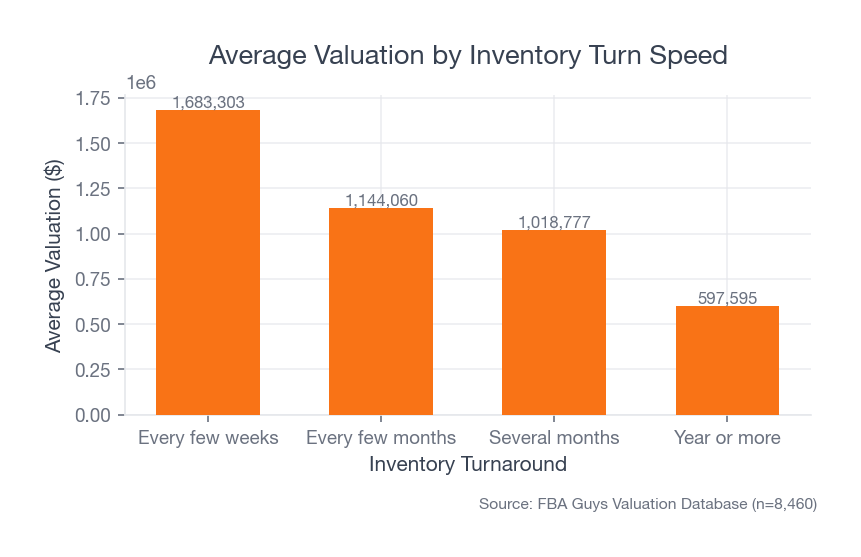
Inventory turn data tells the same story from another angle.
Businesses turning inventory every few weeks averaged $1,683,303 in valuation in our successful-valuation dataset. Businesses turning every few months averaged $1,144,060. Several-month turn businesses averaged $1,018,777.
Margins were surprisingly close across those groups: 45.9%, 44.8%, and 46.5%. That is the useful part. The higher-valuation group wasn't simply the one with the highest average margin. It was the group where inventory moved faster through the business.
 Source: FBA Guys Valuation Database (n=8,460)
The fact is, FBA fees punish drift. A product can have a respectable gross margin and still be a mediocre business if inventory sits too long, gets sent in too awkwardly, or requires constant cash to stay in stock.
For one early draft of this article, we treated the fee topic like a packaging and calculator guide. Useful, but thin. The inventory data changed the article. The boring operational part was the actual story. Of course it was.
So where does that leave the operator who wants an actual checklist?
Start by separating fee reduction from margin improvement. Fee reduction asks whether Amazon charged less. Margin improvement asks whether the business kept more money after the whole operating system did its work. You want both, but you shouldn't confuse the first for the second.
Reduce fulfillment fees by auditing the physical unit
Start with the object Amazon has to handle.
Small changes in packaging can move a SKU into a different size tier, reduce dimensional weight, lower packaging waste, and reduce damage rates. Sometimes the fix is product engineering. Sometimes it is a smaller insert, a tighter box, removing dead air, or packaging a bundle differently.
Run the SKU through Amazon's Revenue Calculator and your own landed-cost model after every physical change. The calculator is useful because it forces the fee table to meet the actual product dimensions. Your landed-cost model is useful because Amazon's fulfillment fee is only one line in the unit.
The practical audit looks like this:
- Pull your current dimensions, unit weight, shipping weight, and size tier from Seller Central.
- Compare them against the physical product and packaging you actually ship.
- Check whether Amazon's measured dimensions match your internal measurements.
- Model the next lower size or weight tier and ask what has to change physically to reach it.
- Recalculate contribution margin after the packaging change, not just the fulfillment fee.
A $0.20 fee improvement is not always worth a packaging redesign. A $0.20 improvement on a high-velocity SKU with clean execution can be very real money.
The awkward part is that packaging projects rarely stay inside the spreadsheet. A tighter carton may reduce dimensional weight and increase damage. A smaller insert may save cost and create more customer confusion. A bundle redesign may lower the fulfillment fee while increasing return rates because the customer expected the pieces to arrive separately. You won't know that from the fee preview alone.
What should you test first?
Start with SKUs where the fee tier is close to a boundary, the product moves enough units for the saving to matter, and the packaging change won't create a customer-experience problem. If you sell a compact accessory with inflated packaging, this can be a clean win. If you sell fragile, oversized, or giftable products, the packaging decision has to survive more than the fee table.
Reduce storage fees by changing the replenishment habit
Storage fees are easy to describe and harder to manage. Amazon charges for space. The amount depends on size, volume, product type, and season. Aged inventory adds pressure once units sit too long.
The fix begins before the inventory is old.
If you only review slow inventory after it becomes aged inventory, the decision has already become worse. You are paying fees on a stale decision and then paying again to remove, liquidate, discount, or keep waiting. That waiting is expensive because it feels passive.
Build a monthly inventory review around three lists:
- Units likely to age before the next review.
- SKUs with more days of supply than the reorder plan requires.
- SKUs where FBA stock and non-FBA stock are solving the same problem twice.
This is where a lot of sellers discover the little line item called "Amazon Misc" in the accounting export, with $417 one month, $1,286 the next, and no one quite ready to explain which fee made the jump. It is not a scandal. It is a filing cabinet with receipts falling out of it.
You can work with that, but only if the review happens before the fee is old news.
One useful habit is to assign every slow SKU to a decision category before it becomes embarrassing: keep, discount, bundle, remove, liquidate, or stop replenishing. That last option is underrated. Some SKUs deserve a graceful exit rather than another purchase order that keeps the storage meter running for one more season.
Use inbound placement choices deliberately
The FBA inbound placement service exists because placing inventory closer to customers across fulfillment centers is part of how Amazon delivers quickly. Amazon says sellers see a cost estimate for available inbound placement options when creating a shipping plan, and the charge is based on inbound location and quantities received.
That means the cheapest-looking shipment plan may not be the cheapest operating decision.
Single-location or minimal-split shipment options can reduce labor and prep complexity. Multiple destination splits can reduce or avoid certain placement costs, but they may increase freight coordination, prep work, box count, and 3PL handling. The right answer depends on shipment size, SKU mix, labor cost, carton configuration, and how often you replenish.
Make the placement decision visible. Put the inbound placement estimate, freight quote, prep cost, and labor impact in the same model. If the placement fee is the only number on the page, the model is half dressed.
This gets especially messy with mixed cartons, seasonal pushes, and catalogs where one slow oversized item rides along with otherwise efficient replenishment. The shipment plan may be technically correct and still expensive in a way your monthly P&L won't explain cleanly later. If your team can't look back and say why you chose the placement option, you didn't make a decision. You accepted a screen.
Treat low-inventory exposure as a planning signal
Trying to run FBA too lean has its own cost.
Amazon's low-inventory-level fee has been one of the more irritating fee concepts because it sits near a genuine operating tension. Too much stock creates storage and aged inventory pressure. Too little stock can create low-inventory exposure, stockout risk, slower availability, and lost sales momentum.
The useful target is not "as little inventory as possible." The useful target is enough sellable inventory in the right fulfillment path to protect velocity without letting cash sit still.
For replenishment planning, use a buffer above the danger zone rather than planning to land exactly on it. Your supplier lead time, freight variability, receiving lag, and FBA check-in time all belong in the reorder math. A spreadsheet that assumes a container arrives on the day you want it to arrive is a very polite work of fiction.
How much buffer is enough? The honest answer depends on volatility. A steady consumable with domestic replenishment can run tighter than a seasonal imported product with a factory shutdown sitting in the middle of the reorder cycle. The point is to choose the buffer deliberately and review it after reality has had a chance to embarrass the forecast.
Decide when AWD, 3PL, or FBM belongs in the system
Amazon Warehousing and Distribution can lower some costs for the right seller. Amazon describes AWD as bulk storage that can distribute inventory to Amazon and non-Amazon channels, with pricing that covers FBA inbound placement so there is no separate charge for that service. Amazon also says AWD has no seasonal surcharges and supports auto-replenishment into FBA.
That can be useful.
It can also be unnecessary complexity for a small catalog with simple replenishment. The question is whether bulk storage and replenishment reduce the total system cost after you include receiving, storage, outbound processing, transportation, software, labor, and the new failure points you introduce.
The same logic applies to 3PL and FBM. In our successful-valuation dataset, pure FBA businesses averaged 45.1% margins and $1,263,506 in valuation. Combination fulfillment businesses averaged 46.6% margins and $1,385,167. That does not prove combination fulfillment creates value. Larger and more mature businesses are more likely to use multiple fulfillment paths.
Still, the pattern supports a practical point: fulfillment model is a design choice. FBA is often the right default for Prime conversion, customer service, and operational simplicity. Some SKUs deserve a different path.
If you test an alternate path, test it like an operator rather than a philosopher. Pick a SKU where FBA is structurally awkward: oversized, slow, expensive to store, or useful on non-Amazon channels. Track conversion, delivery promise, customer service load, return behavior, and actual labor. The answer may be boring. Boring is fine if it is cheaper.
SKU complexity widens the fee surface
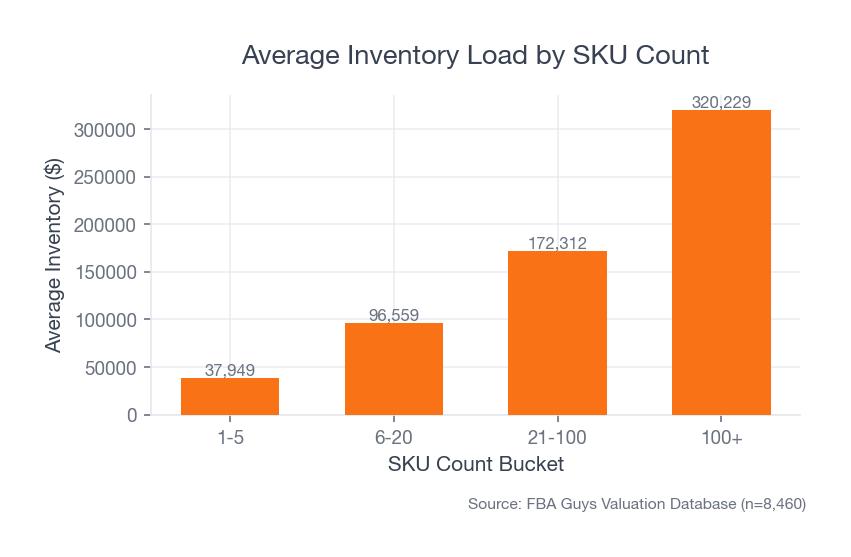
The more SKUs you carry, the more ways the fee system can find you.
In our data, 1-5 SKU businesses averaged $37,949 in inventory and 47.0% margin. Businesses with 100+ SKUs averaged $320,229 in inventory and 44.7% margin. The larger SKU group also averaged much higher valuation, so this is not an argument against catalog expansion.
 Source: FBA Guys Valuation Database (n=8,460)
It is an argument for catalog discipline.
Every added SKU brings its own size tier, inbound plan, storage profile, return behavior, replenishment rhythm, stranded-inventory risk, and fee-review workload. A catalog can grow into a stronger business. It can also become a fee garden that nobody weeds because every individual SKU looks too small to matter.
This is why SKU cleanup can be a fee reduction tactic even when no single fee changes. You remove low-contribution decisions from the system. You reduce the number of reorder points, cartons, labels, stranded units, suppressed listings, return profiles, and stale reports your team has to monitor. Sometimes the cleanest fee saving is one less tiny problem surviving another quarter because nobody wanted to say the SKU was done.
Build a monthly FBA fee review
A useful FBA fee review should take less than an hour once the files are set up. If it takes half a day, it won't survive.
Review these lines every month:
- Fulfillment fee changes by SKU.
- Storage fees by SKU and cubic volume.
- Aged inventory exposure.
- Inbound placement charges by shipment.
- Return processing and reimbursement activity.
- Removal, disposal, and liquidation charges.
- Low-inventory exposure or forecasted stockout risk.
- Advertising spend on SKUs where fee load already weakens contribution margin.
Then sort by dollars, not annoyance. The fee that bothers you most is not always the fee that matters most.
The best review ends with decisions: remeasure this SKU, resize this packaging, change this reorder point, liquidate this stale unit, split this inbound shipment differently, move this backup stock to AWD or a 3PL, test FBM on this oversized slow mover.
You don't need drama. You need a list that produces work.
If the review produces only observations, shorten it. A report that says "storage fees increased" has told you almost nothing. Which SKUs did it? Why did they do it? Was the increase caused by seasonality, overbuying, slower sell-through, carton size, a delayed promotion, a receiving issue, or a product that should have been killed three months ago?
The review should end with owners and dates. Not because the spreadsheet needs ceremony. Because fees are lagging indicators, and lagging indicators have a nasty habit of looking obvious only after they have already taken the money.
FAQ
What is the fastest way to reduce Amazon FBA fees?
The fastest practical move is to audit your highest-volume SKUs for size, weight, storage time, and inventory age. Start where a small per-unit change has enough volume to matter. A one-off fee win on a slow SKU is emotionally satisfying and financially boring.
Can I reduce FBA fees without leaving FBA?
Yes. Most fee reduction happens inside FBA: packaging changes, cleaner replenishment, better inbound placement choices, aging-inventory cleanup, and SKU-level review. Leaving FBA only makes sense when the alternative fulfillment path improves total contribution margin after labor, shipping, service level, and conversion are included.
Does AWD reduce FBA fees?
AWD can reduce some costs for sellers who need bulk storage and replenishment into FBA. Amazon says AWD pricing covers FBA inbound placement, so there is no separate charge for that service through AWD. The math still depends on your SKU mix, regions, case configuration, replenishment cadence, and non-Amazon channel needs.
Should I keep less inventory in FBA to avoid storage fees?
Keep smarter inventory in FBA. Less inventory can reduce storage pressure, but running too lean can create stockouts, slower availability, and low-inventory exposure. The useful number is not the lowest possible stock level. It is the level that protects sales velocity without trapping cash in slow units.
How often should I review FBA fees?
Monthly is the right rhythm for most operators. Weekly reviews create noise unless you are managing a large or volatile catalog. Quarterly reviews usually catch problems after the fees have already become expensive.
Curious what your business is worth?
Get a free, instant valuation and see how your Amazon business stacks up.
Get Your Free Valuation